Why RAM Is Slow: A Tiny Excerpt From Ulrich Drepper's Famous Paper
Note: The diagrams in this post are optimized for light mode. If you’re reading in dark mode, consider switching for better visibility.
If you do low-latency programming or just systems programming in general, you’ve likely encountered (or at least heard of) Ulrich Drepper’s “What Every Programmer Should Know About Memory” (Drepper, 2007). He suggests that Section 2 (RAM hardware details) can be skimmed:
This section’s content is nice to know but not absolutely critical to be able to understand the later sections. Appropriate back references to the section are added in places where the content is required so that the anxious reader could skip most of this section at first (Drepper, 2007).
I am impatient and anxious indeed, but I also like to know why and how things work. So, this blog post is my notes on Section 2 from the paper, which is mostly about understanding why RAM is slow, not just that it’s slow.
In particular, this post distills Section 2 into the following concepts: what makes DRAM fundamentally slower than SRAM, the row/column access model that explains why sequential access beats random access, and the overhead costs (precharge, refresh) that create the “dead time” in memory operations. I’ll skip the DDR2/DDR3 timing diagrams.
Finally, note that this paper was from 2007, so of course some things may (surely) have changed and progressed. So, keep that in mind.
Table of Contents
- Background
- How SRAM and DRAM Stores a Single Bit
- The Row/Column Access Model
- The True Cost of a Memory Access
- Why Sequential Beats Random
- Refresh: The Hidden Tax
- What to Carry Forward
- References
Background
What is a RAM, and why do we care how fast it is?
RAM (Random Access Memory) is a computer’s working memory. When you run a program, the CPU loads the program’s code and data from disk (SSD or HDD) into RAM, then executes from there. The CPU can’t work directly with data on disk because disk access is far too slow. So, RAM acts as a fast staging area: the CPU reads instructions and data from RAM, does computation, and writes results back to RAM.
The term “random access” means you can read or write any location in memory directly, without having to read through everything before it (unlike a tape drive, where you’d have to wind through the tape to reach a specific point). This is in contrast to “sequential access” storage.
But “fast” here is relative. So we have to be a little bit more precise than that.
When we say RAM is fast, we mean it’s fast compared to disk, but not that fast compared to the CPU itself. This brings us to the memory hierarchy:
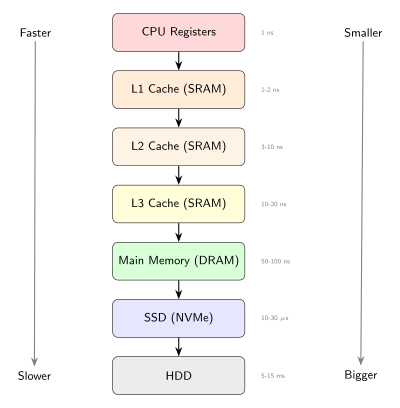
The diagram above shows the layers between the CPU and permanent storage. At the top, CPU registers are the fastest (sub-nanosecond access), but there are only a few dozen of them. At the bottom, hard drives can store terabytes but take milliseconds to access. RAM sits in the middle: it can store gigabytes and responds in tens of nanoseconds.
The point here is each layer exists because the layer above it is too small, and the layer below it is too slow. Caches (L1, L2, L3) exist because RAM is too slow for the CPU. RAM exists because SSDs/HDDs are too slow for the caches. This hierarchy is a series of trade-offs between speed, size, and cost.
When I say “RAM is slow,” I mean slow compared to the CPU (yes the title is a clickbait haha). A modern CPU running at 3 GHz executes roughly 3 billion cycles per second, or one cycle every 0.33 nanoseconds. A single RAM access takes 50-100 nanoseconds, which is 150-300 CPU cycles. During those cycles, the CPU is stalled, waiting for data. If your program frequently accesses RAM (and the data isn’t in cache), those stalls add up and dominate your execution time. So it’s pretty useful to understand how RAM works.
The rest of this post explains why RAM takes 50-100 nanoseconds, which comes down to the physics of how DRAM stores bits.
But before that, I mentioned “DRAM” specifically.
Isn’t all RAM just… RAM? Not quite. There are different types of RAM, and they differ dramatically in speed and cost. The two you’ll encounter most are SRAM (Static RAM) and DRAM (Dynamic RAM). SRAM is fast and expensive; DRAM is slow and cheap. Your CPU caches use SRAM. Your main memory (the “RAM” you buy in sticks and tell your friends about) uses DRAM. Understanding why they differ requires looking at how each stores a single bit. So we’ll take a look at that first.
How SRAM and DRAM Stores a Single Bit
Before comparing SRAM and DRAM, we need to address a more fundamental question: I mean, what does it really mean for hardware to “store” a bit?
When we think of storing something, we usually imagine putting an object in a container: a book on a shelf, a file in a drawer. But computers don’t store bits this way. There’s no tiny box holding a “1” or a “0”. Instead, a bit is stored by maintaining a physical state that we interpret as 1 or 0. Okay, but what does that means?
It means the hardware doesn’t contain the number; it represents it through some measurable property. But what property exactly? That depends on the technology. In magnetic storage (hard drives), it’s the orientation of magnetic domains. In flash storage (SSDs), it’s trapped electrons in a floating gate. In RAM, it’s electrical state: either a voltage level or a charge.
The important point here is “storing a bit” means “maintaining a physical condition that can later be measured and interpreted as 0 or 1”. How such physical condition is maintained is what we’re going to discuss soon.
With this in mind, let’s look at how RAM is organized. A RAM chip contains millions (or billions) of cells, each storing one bit. These cells are arranged in a two-dimensional grid:
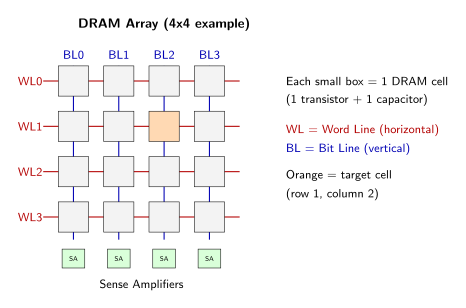
Each small square is one cell. To access a specific bit, the memory controller selects a row and column. We’ll explore this addressing scheme in detail later (see The Row/Column Access Model). For now, the point is that RAM is an array of identical cells, and understanding RAM performance means understanding what happens inside a single cell.
So, what does a single RAM cell look like? This is where SRAM and DRAM differ. Both store bits using electrical state, but they use completely different mechanisms, and those mechanisms explain the speed and cost differences.
SRAM: Storing a Bit with Feedback
SRAM stores a bit using a feedback loop of transistors1. An SRAM cell uses six transistors in total. The following very simplified diagram shows the conceptual structure of an SRAM cell:
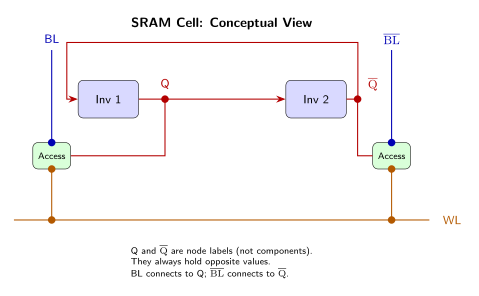
(note: for those with EE background: yes, I know. Circuit diagrams aren’t usually drawn like this; this is to make it easier for other readers)
The storage element (center)
In the middle of the diagram are two inverters, Inverter 1 (Inv 1) and Inverter 2 (Inv 2). An inverter2 is a simple circuit that outputs the opposite of its input: feed it a 1, it outputs 0; feed it a 0, it outputs 1. Here, they play the role of storing the actual bit. How do they do that?
They do that by being connected in a feedback loop (shown by the red arrows): the output of Inverter 1 feeds into the input of Inverter 2, and the output of Inverter 2 feeds back into the input of Inverter 1. This loop is what holds the data: if Inverter 1 outputs “1”, that feeds into Inverter 2, which outputs “0”, and that “0” feeds back into Inverter 1, which (since it inverts) outputs “1” again. In other words, the loop locks itself into a stable state.
Now, if Inverter 1 outputs “1” and Inverter 2 outputs “0”, which one is the stored bit? The answer is that the cell has two stable states, and we define one state as “storing 0” and the other as “storing 1”. For example:
- State A: Inverter 1 outputs HIGH, Inverter 2 outputs LOW → we call this “storing 1”
- State B: Inverter 1 outputs LOW, Inverter 2 outputs HIGH → we call this “storing 0”
Note: which state represents “storing 0” vs “storing 1” is a design convention. There’s nothing in the physics that mandates this assignment; as long as the read and write circuitry agrees on the convention, it works.
Thus, the “bit” isn’t a voltage level you read from one specific point. The “bit” is which of the two states the circuit is in. When you want to store a “0”, you force the circuit into State B. When you want to store a “1”, you force it into State A (how do we “force” a state? I will explain that shortly). Once forced, the feedback loop keeps it there indefinitely (as long as power is supplied). So, the bit isn’t stored as charge that might leak (unlike DRAM which we will see later); it’s stored as an active, self-sustaining voltage pattern.
Note that each inverter in the simplified diagram above requires 2 transistors, so the storage element alone uses 4 transistors. This count will matter when we compare to DRAM’s single transistor.
The access transistors (green boxes)
Okay so far we know that the job of the storage element is to hold data. Now, how do we get data in or out? That’s what the access transistors are for. In the diagram earlier, those are the green boxes labelled “Access”.
You can think of them like switches that control whether the storage element is connected to the bit lines (the wires that carry data in and out of the cell) or not.
When the access transistors are off (not conducting), the storage element is isolated: it just sits there holding its state, disconnected from the rest of the circuit. When they’re on (conducting), the storage element connects to the bit lines, allowing us to read the current state or write a new one.
There are 2 access transistors (one for each side of the storage element), bringing the total transistor count to 6.
The word line3 (horizontal orange line)
The horizontal orange line is called the “select” signal. When the memory controller wants to access this particular cell, it raises the word line (raising a word line means applying voltage to it, switching it from LOW to HIGH). This turns on both access transistors, connecting the storage element to the bit lines. All cells in the same row share the same word line.
The bit lines (vertical blue lines)
The two vertical blue lines are bit lines. They carry data into and out of the cell. SRAM uses two bit lines ($\text{BL}$ and $\overline{\text{BL}}$)4 because the two inverters produce complementary outputs, $Q$ and $\overline{Q}$. Let’s see how they’re used in reading and writing.
Reading: The word line is raised, turning on the access transistors. This connects $Q$ to $\text{BL}$ and $\overline{Q}$ to $\overline{\text{BL}}$. The current values at $Q$ and $\overline{Q}$ (which are always opposite) immediately appear on the bit lines. External sense circuitry compares $\text{BL}$ and $\overline{\text{BL}}$ to determine which state the cell is in: if $\text{BL}$ is higher (meaning $Q$ is HIGH), the cell is in State A (storing “1”); if $\overline{\text{BL}}$ is higher (meaning $\overline{Q}$ is HIGH), the cell is in State B (storing “0”). There’s no waiting for anything to charge or discharge. The data is just there, actively held by the feedback loop.
Writing: The memory controller first drives $\text{BL}$ and $\overline{\text{BL}}$ to the desired complementary values (e.g., $\text{BL}$ high, $\overline{\text{BL}}$ low to write a “1”). Then it raises the word line, connecting the bit lines to $Q$ and $\overline{Q}$. An important thing to note here is the external circuitry driving the bit lines is designed to be stronger than the inverters’ feedback loop. This “strength” is a matter of transistor sizing: the bit line drivers use larger transistors that can source/sink more current than the inverters can resist. Due to the strong external drive, this external circuitry overpowers the weak internal feedback, thereby forcing $Q$ and $\overline{Q}$ to the new values. Then, when the word line is lowered (disconnecting the bit lines), the feedback loop takes over and holds this new state.
Okay let’s recap: so, how does SRAM store a single bit? By maintaining a feedback loop that locks into one of two stable states. The circuit stays in that state indefinitely, with no maintenance required.
Now we can see why SRAM is fast: when you read, there’s no capacitor to discharge (unlike DRAM which we will see soon), no charge to amplify, no data to restore. The inverters are actively holding their state at full voltage levels. You raise the word line and the data is immediately available. This is fundamentally different from DRAM, as we’ll see next.
DRAM: Storing a Bit with Charge
DRAM takes a completely different approach. Instead of a feedback loop that actively maintains state, DRAM stores a bit as charge on a capacitor. A charged capacitor represents 1; a discharged capacitor represents 0. This is passive storage: the bit exists as trapped electrons, not as an active circuit holding a voltage level.
A DRAM cell uses just one transistor and one capacitor:
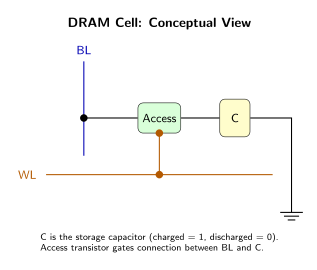
Compare this to SRAM’s six transistors. The DRAM design is much simpler and it’s why DRAM dominates main memory: fewer components per bit means you can pack more bits into the same area. But this simplicity comes with fundamental trade-offs that we’ll see in the reading and writing operations.
The storage capacitor
The capacitor is the heart of the DRAM cell. It stores the bit as electrical charge: a charged capacitor (holding electrons) represents 1, and a discharged capacitor (no charge) represents 0.
This is fundamentally different from SRAM. In SRAM, the bit was which of two stable states the feedback loop was in. Here, the bit is whether or not electrons are trapped in the capacitor. There’s no active circuit maintaining anything; the charge just sits there passively.
But this notion of “just sits there” is a problem. It causes what we call capacitors leak. The charge slowly drains away through various leakage paths (I mean nothing is ideal, the transistor isn’t a perfect switch, and the capacitor’s dielectric isn’t a perfect insulator). A DRAM cell will lose its data within milliseconds if not periodically refreshed. This is why it’s called “dynamic” RAM (DRAM): the data is not stable; it requires constant maintenance. I’ll discuss refresh in more detail later (see Refresh: The Hidden Tax).
The access transistor
The transistor acts as a gate between the capacitor and the bit line. When the transistor is off (not conducting), the capacitor is isolated from the rest of the circuit. When it’s on (conducting), charge can flow between the capacitor and the bit line.
This is analogous to SRAM’s access transistors, which also gate access to the storage element. The difference is what they’re gating access to: in SRAM, it’s a feedback loop actively holding a voltage; in DRAM, it’s a capacitor passively holding charge.
The word line
Like in SRAM, the word line selects which row of cells to access. When the memory controller raises the word line (applies voltage), it turns on the access transistor, connecting the capacitor to the bit line. All cells in the same row share the same word line.
The bit line
The bit line carries data into and out of the cell. Unlike SRAM, which uses two complementary bit lines ($\text{BL}$ and $\overline{\text{BL}}$), DRAM uses just one bit line per cell. This is because DRAM doesn’t have complementary outputs; it has a single capacitor whose charge level must be sensed.
Now let’s see how reading and writing actually work. This is where DRAM’s physics problems become more clear.
Reading: To read a DRAM cell, you raise the word line, turning on the access transistor. This connects the capacitor to the bit line, and charge redistributes between them.
Here’s the first problem: reading is destructive. When you connect the tiny capacitor to the much larger bit line, the capacitor’s charge spreads out. If the capacitor was charged (storing 1), some of that charge flows onto the bit line, partially discharging the capacitor. If the capacitor was discharged (storing 0), some charge from the precharged bit line flows into the capacitor. Either way, the point is the act of reading disturbs the stored value.
The voltage change on the bit line is tiny because the capacitor is tiny (femtofarads) while the bit line has significant parasitic capacitance. A sense amplifier5 detects this small voltage perturbation and amplifies it into a full digital signal. Now comes the second problem: this takes time. The sense amplifier must wait for the charge to redistribute and the voltage to stabilize before it can reliably distinguish between a stored 0 and 1. This is different from SRAM, where the data is immediately available at full voltage levels the moment you raise the word line.
After the sense amplifier determines the bit value, it must write the value back to restore the capacitor to its original state. This happens automatically: the amplified signal is fed back to recharge (or fully discharge) the capacitor. In other words, every read is actually a read-then-write operation.
Writing: To write to a DRAM cell, the memory controller first drives the bit line to the desired voltage: high to write a 1, low to write a 0. Then it raises the word line, connecting the capacitor to the bit line. The capacitor charges or discharges to match the bit line voltage. When the word line is lowered, the transistor turns off, trapping whatever charge the capacitor acquired.
This is simpler than SRAM writing in one sense: there’s no feedback loop to overpower. You just dump charge in or drain it out. But it’s slower because you must wait for the capacitor to fully charge or discharge.
Now, summarizing the key differences between SRAM and DRAM, we get the following comparison table:
| Aspect | SRAM | DRAM |
|---|---|---|
| Storage mechanism | Feedback loop (active) | Capacitor charge (passive) |
| Components per cell | 6 transistors | 1 transistor + 1 capacitor |
| Reading | Non-destructive, immediate | Destructive, requires restore |
| Data retention | Indefinite (with power) | Milliseconds (needs refresh) |
| Speed | Fast | Slow |
| Density | Low | High |
| Cost | Expensive | Cheap |
As you can see, the trade-off is very obvious. SRAM cells are larger, consume more power (the feedback loop requires constant current), and are more expensive to manufacture. But they’re fast. DRAM cells are tiny, cheap, and dense. But they’re slow and require constant maintenance. For main memory, where we need gigabytes of storage, density and cost win. We accept DRAM’s slowness and work around it with caches.
You might ask: if SRAM takes more space per bit, why does it fit in a small CPU while DRAM needs big RAM sticks? The answer is the amount of storage. CPU caches (SRAM) store very little data: L1 cache is typically 32-64 KB per core, L2 is 256 KB - 1 MB, L3 is 8-64 MB shared, totaling maybe 50-100 MB in a modern CPU. Main memory (DRAM), on the other hand, stores 8-128 GB, which is 100-1000x more. So even though SRAM is less dense, caches store so little data that they still fit on the CPU die. DRAM is denser per bit, but it’s storing so much more data that it needs dedicated chips on separate modules. The reason caches are small is precisely because SRAM is expensive and takes more space per bit. We use the minimum amount of fast SRAM we can get away with, and offload bulk storage to cheap, dense, slow DRAM.
Okay let’s recap: how does DRAM store a single bit? By trapping charge in a capacitor. A charged capacitor represents 1; a discharged capacitor represents 0. Unlike SRAM’s self-sustaining feedback loop, this is passive storage that leaks over time and gets disturbed when read.
So now we have an idea why DRAM is slow: reading requires waiting for tiny charges to redistribute and for sense amplifiers to detect millivolt-level differences. Every read destroys the data and requires a restore cycle. And in the background, every cell must be periodically refreshed to prevent data loss. None of these problems exist in SRAM, which is why caches use SRAM despite its higher cost.
The Exponential Reality
Now, let’s do some litte math and physics to make the description above more quantitative. When you read a DRAM cell, you open the transistor gate and let the capacitor’s charge flow onto the bit line. The voltage on that line changes according to the exponential discharge curve:
$$V(t) = V_0 \cdot e^{-\frac{t}{RC}}$$where $R$ is the resistance of the path (primarily the access transistor), $C$ is the total capacitance (the cell capacitor plus the bit line’s parasitic capacitance), and $t$ is time. The product $RC$ is called the time constant, and it determines how fast the voltage decays.
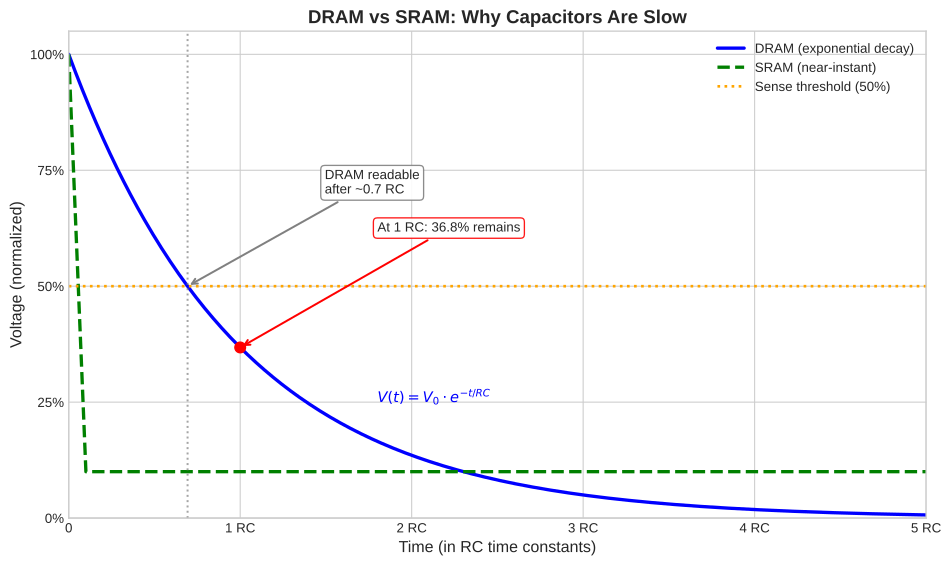
(note: the 50% sense threshold shown is a simplification. Real DRAM sense amplifiers detect much smaller voltage differences (tens to hundreds of millivolts) relative to a reference, rather than waiting for 50% decay)
As you can see, the signal doesn’t snap from high to low. Instead, it decays exponentially. The sense amplifier must wait until the voltage has changed enough to reliably distinguish a stored 1 from a stored 0. This takes several nanoseconds. SRAM, by contrast, provides its output almost immediately when the word line is raised (the dashed green line in the diagram) because there’s no capacitor to discharge. It uses the feedback loop which is already holding the answer at full voltage.
This exponential decay is the physics behind DRAM’s latency. Basically it’s just how capacitors work: tiny charge (femtofarads), destructive reads, and charge leakage.
The Row/Column Access Model
We now understand why a single DRAM cell is slow: reading means waiting for a tiny capacitor to discharge through an exponential curve, detecting millivolt-level changes with a sense amplifier, and then restoring the charge. But a single cell stores just one bit. A real DRAM chip contains billions of cells. How do you scale from one cell to billions, and what does that scaling do to performance?
The first question is addressing: how does the memory controller tell the chip which cell it wants?
The naive approach would be to have a separate wire for each cell. To access cell #12345, you’d send a signal on wire #12345. But a chip with 1 billion cells would need 1 billion wires, which is physically impossible. Instead, DRAM uses address lines: a small set of wires that carry a binary-encoded address.
Each address line can be in one of two states: HIGH (representing 1) or LOW (representing 0). With a single address line, you can distinguish between 2 cells (line is HIGH → cell 1, line is LOW → cell 0). With two address lines, you can distinguish between 4 cells (the four combinations: 00, 01, 10, 11). In general, with $n$ address lines, you can encode $2^n$ different addresses. So 30 address lines can address $2^{30}$ ≈ 1 billion cells. The chip contains decoding circuitry that reads the binary pattern on these lines and activates the corresponding cell.
But even 30 address lines creates problems. Routing 30 wires to every chip, keeping them synchronized, and building the decoding circuitry is expensive. DRAM solves this with a clever trick: it organizes cells into a two-dimensional grid and splits the address into two parts (a row address and a column address) sent sequentially over the same wires.
The following diagram shows a simplified 4x4 DRAM array:
The horizontal red lines are word lines (one per row). The vertical blue lines are bit lines (one per column). Each cell sits at the intersection of one word line and one bit line. This is the row/column access model: to access a cell, you first specify the row, then specify the column.
With this scheme, a chip that would need 30 address lines can get by with just 15: send the row address first (using 15 lines to select one of $2^{15}$ = 32,768 rows), then reuse the same 15 lines to send the column address (selecting one of $2^{15}$ = 32,768 columns). The timing signals that coordinate this are called RAS (Row Address Strobe) and CAS (Column Address Strobe).6
Now, when you activate a row, you’re not just “selecting” it in some abstract sense. You’re raising the word line, which turns on the access transistor of every cell in that row. Remember what happens when you turn on a DRAM cell’s access transistor: the capacitor connects to the bit line, and charge redistribution begins. So, the exponential discharge curve we discussed is happening simultaneously in thousands of cells.
During a read, the following happen:
-
Row address sent: The memory controller puts the row address on the address bus and asserts RAS.
-
Row activation: The DRAM chip raises the word line for the selected row. This turns on every access transistor in that row, connecting thousands of tiny capacitors to their respective bit lines. Charge begins flowing. Every cell in the row is now undergoing the same exponential discharge process we saw earlier, all at once, in parallel.
-
Waiting for sense amplifiers (tRCD): The memory controller waits for tRCD (RAS-to-CAS Delay) clock cycles. This delay exists because all those capacitors need time to discharge enough for the sense amplifiers to detect the voltage change. Remember, we’re talking about femtofarad capacitors creating millivolt perturbations on bit lines with significant parasitic capacitance. The sense amplifiers need time to stabilize before they can reliably distinguish stored 1s from stored 0s. This is the same physics we discussed for a single cell, but now it’s happening across an entire row.
-
Column address sent: The memory controller puts the column address on the address bus and asserts CAS.
-
Column selection: The DRAM chip selects the appropriate sense amplifier’s output based on the column address. At this point, all sense amplifiers in the row have already captured and amplified their cells’ values. The column address just picks which one to put on the data bus.
-
Waiting for data (CL): The memory controller waits for CL (CAS Latency) clock cycles before the data appears on the data bus.
Notice that once a row is open, accessing different columns within that row is fast. The expensive part (waiting for thousands of capacitors to discharge and sense amplifiers to stabilize) has already been paid during row activation. The sense amplifiers now hold the amplified data for every cell in the row. Subsequent column accesses (to different columns in the same row) incur only the CAS latency, not the full row activation delay.
This is why DRAM modules support burst transfers. After the initial row activation, you can read multiple consecutive columns with minimal additional delay. The memory controller specifies a starting address, and the DRAM chip streams out consecutive words (the burst length, typically 4, 8, or 16) without requiring new RAS signals for each word. This amortizes the row activation cost across multiple data transfers, which is far more efficient than activating a new row for every word.
The True Cost of a Memory Access
The previous section showed that accessing different columns within an open row is fast: you pay the CAS latency for each subsequent column, but skip the expensive row activation. But what happens when you need data from a different row?
Before you can open a new row, you must close the current one. This process is called precharging, and it’s necessary process. When you activated the previous row, all its cells discharged onto the bit lines, pulling those lines toward either HIGH or LOW depending on the stored values. Before you can activate a new row, those bit lines must be restored to a neutral voltage (typically halfway between HIGH and LOW). This neutral state is what allows the sense amplifiers to detect the small voltage perturbations when the next row’s capacitors discharge. Without precharging, the sense amplifiers couldn’t distinguish new data from the remnants of the previous row.
Let’s trace through what happens when you access a cell in a different row than the currently open one:
Step 1: Precharge the old row (tRP). The memory controller issues a precharge command. This disconnects the current row from the bit lines (by lowering its word line), restores all bit lines to their neutral voltage, and ensures any pending write-back operations complete. This takes tRP (Row Precharge time) clock cycles.
Step 2: Activate the new row (tRCD). After precharging completes, the memory controller sends the new row address and asserts RAS. The DRAM chip raises the new row’s word line, connecting all its capacitors to the bit lines. The familiar exponential discharge begins, and the sense amplifiers wait to detect the voltage changes. This takes tRCD (RAS-to-CAS Delay) clock cycles.
Step 3: Select the column and wait for data (CL). The memory controller sends the column address and asserts CAS. After CL (CAS Latency) clock cycles, the requested data appears on the data bus.
The total cost of a row miss is therefore tRP + tRCD + CL clock cycles.
There’s one more constraint: tRAS (Active to Precharge delay). After activating a row, you must wait at least tRAS cycles before precharging it. This minimum time ensures the sense amplifiers have fully restored the capacitors’ charge (remember, reading is destructive, and the sense amplifiers must write the data back). If your access pattern is “activate row, read one column, immediately precharge,” and tRAS is longer than tRCD + CL + transfer time, you’ll have dead time before you can even begin the precharge.
To visualize these delays, consider the following timing diagram showing a complete row-miss access:
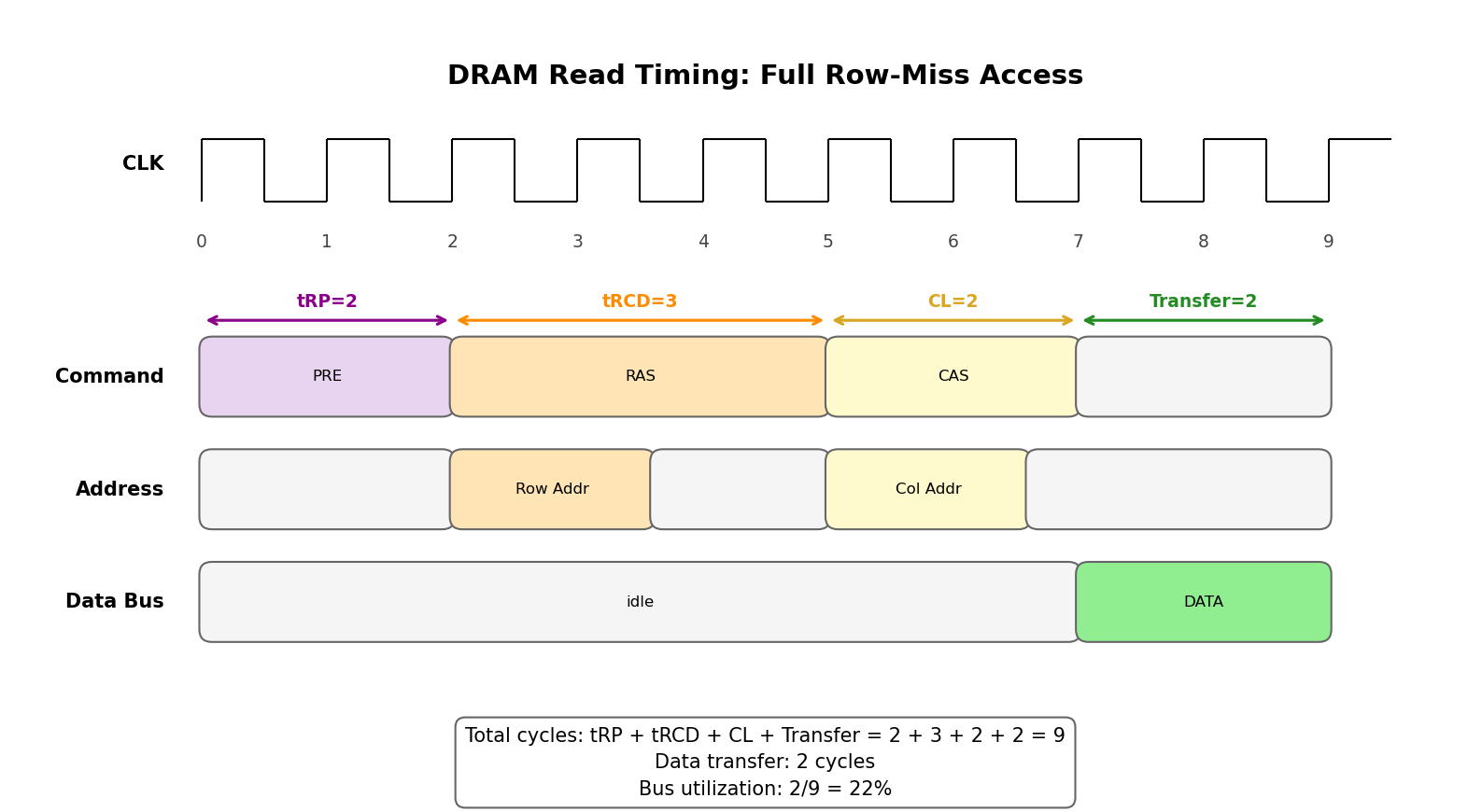
The diagram walks through the full sequence: PRE (precharge the old row), RAS (activate the new row), CAS (select the column), then finally the data transfer. The Address row shows when the address bus carries valid data: the first pulse is the row address (sent with RAS), the second is the column address (sent with CAS).
Notice how much time the data bus sits idle. During tRP (2 cycles), the bus waits for the precharge to complete. During tRCD (3 cycles), the bus waits for the row to activate and sense amplifiers to stabilize. During CL (2 cycles), the bus waits for the column data to be routed to the output. Only during the final 2 cycles is the bus actually transferring data.
A note on “Transfer”: unlike tRP, tRCD, and CL, “transfer” isn’t a named DRAM timing parameter. It’s simply the time to move the requested data across the bus once it’s ready. This depends on how much data you’re reading: a burst of 4 words on DDR takes 2 cycles (DDR transfers on both clock edges). The example uses 2 cycles as a typical value.
You might wonder: where is tRAS? Recall that tRAS (8 cycles) is the minimum time from row activation until you can precharge that same row. In this diagram, RAS occurs at cycle 2, so the earliest you could issue another PRE for this row is cycle 10. Since we’re showing a single access that ends at cycle 9, tRAS isn’t the bottleneck here. It would matter if we showed back-to-back accesses to different rows, where you might have to wait before precharging.
Drepper provides an example of this inefficiency (Drepper, 2007). Consider a DDR2 module with CL = 2, tRCD = 3, tRP = 2, tRAS = 8. A row-miss access takes at least tRP + tRCD + CL = 2 + 3 + 2 = 7 cycles before data even starts flowing. If the data transfer itself takes 2 cycles, then out of 9 total cycles, the bus is actually transferring data for only 2 of them. That’s roughly 22% utilization. A DDR2-800 bus with a theoretical peak bandwidth of 6.4 GB/s achieves only about 1.8 GB/s for random access patterns. More than 75% of the potential bandwidth is lost to waiting.
These timing parameters are encoded in the specifications you see on RAM modules. The notation “2-3-2-8-T1” means:
| Position | Value | Parameter | Meaning |
|---|---|---|---|
| 1st | 2 | CL | CAS Latency |
| 2nd | 3 | tRCD | RAS-to-CAS Delay |
| 3rd | 2 | tRP | Row Precharge time |
| 4th | 8 | tRAS | Active to Precharge delay |
| 5th | T1 | Command Rate | Minimum cycles between commands |
Lower numbers mean less waiting. When comparing RAM modules, these timing parameters (along with the clock frequency) determine actual performance. A module with lower timings at the same frequency will be faster; a module with higher frequency but worse timings might not be faster in practice, because more cycles are spent waiting.
Why Sequential Beats Random
The previous two sections established the costs: same-row access costs only CL cycles, while a row miss costs tRP + tRCD + CL cycles. With these numbers, we can now quantify the performance difference between sequential and random access patterns.
Sequential access means accessing addresses that are close together, typically within the same DRAM row. When you read consecutive addresses within an open row, you pay the row activation cost once and then each subsequent access costs only CL cycles. Burst transfers exploit this directly: after one row activation, the DRAM chip streams out 8 or 16 consecutive words with minimal additional delay. If CL = 2 and you burst-transfer 8 words, you get 8 words for roughly tRCD + CL + 8 = 13 cycles (assuming 1 cycle per word transfer). That’s about 1.6 cycles per word.
Random access means accessing addresses scattered across different rows. Each access likely hits a different row, forcing a full precharge-activate-access sequence every time. Using our earlier example (CL = 2, tRCD = 3, tRP = 2), each random access costs at least 7 cycles before data even starts flowing, plus transfer time. For a single word, that’s ~9 cycles per word.
This has a pretty fat bandwidth implications. We calculated earlier that random access achieves only ~22% bus utilization (1.8 GB/s actual on a 6.4 GB/s theoretical bus). Sequential access with burst transfers can approach 80-90% utilization because the row activation overhead is amortized across many transfers. The same hardware can deliver 3-4x more bandwidth for sequential access than for random access.
This is why Drepper (and every performance-conscious programmer) emphasizes that access patterns matter (Drepper, 2007). We’ve all heard this phrase. Now we know why.
The DRAM hardware is optimized for sequential, burst-style access. Random access patterns fight against this design. This explains why CPU caches exist (to hide DRAM latency by keeping recently-accessed data in fast SRAM), why prefetching helps (to start row activation early so data arrives before it’s needed), and why data structure layout affects performance (to keep related data in the same row, enabling burst transfers).
Before learning all of this, we just accepted these as magical rules: “avoid pointer chasing,” “use prefetch hints,” “write cache-friendly code,” “prefer arrays over linked lists”. They were incantations that made programs faster for reasons we didn’t fully understand. Now each rule traces back to physics. “Avoid pointer chasing” means minimize row misses. “Prefetch” means pay the tRCD cost before you need the data. “Cache-friendly” means exploit burst transfers by accessing memory sequentially. “Arrays over linked lists” means keep your data in the same row instead of scattering it across random rows.
Beautiful engineering :-)
Refresh: The Hidden Tax
Earlier, when discussing DRAM cells, we noted that capacitors leak charge. A DRAM cell will lose its data within milliseconds if not periodically refreshed. Now let’s quantify this overhead.
The JEDEC7 specification requires that every DRAM cell be refreshed at least once every 64 milliseconds. Using Drepper’s example of a DRAM array with 8,192 rows, this means the memory controller must issue a refresh command approximately every 7.8 microseconds (64ms ÷ 8,192 rows ≈ 7.8μs per row).
During a refresh, the DRAM chip internally performs the same sequence we’ve been discussing throughout this post: it activates a row (raising the word line, connecting all capacitors to bit lines), lets the sense amplifiers detect and amplify the weakened charge, restores the capacitors to full charge, and then precharges. This is essentially a read operation where the data is discarded; the point is to restore the capacitors before they leak below the threshold where a stored “1” becomes indistinguishable from a “0”. While a row is being refreshed, no other access to that row is possible. It’s busy undergoing its activate-sense-restore-precharge cycle, just like a normal read.
The memory controller schedules refresh commands automatically; you cannot control when they happen. If your critical memory access happens to target a row that’s currently being refreshed, the processor stalls until the refresh completes. Drepper cites studies showing that for some workloads, refresh overhead can stall up to 50% of memory accesses (Drepper, 2007).
This adds another layer of unpredictability to DRAM latency. Even if you’ve carefully arranged your data for sequential access and the row you need is already open, a refresh operation can inject unexpected delay. The “50-100 nanosecond” typical DRAM latency mentioned in Background is an average; individual accesses can be significantly slower when they collide with refresh.
What to Carry Forward
Here are the ideas I carry forward from all this (you should too):
DRAM is slow because that’s just how it works. And when we say slow, we mean slow relative to the CPU (cache). We should remember the exponential $RC$ discharge curve discussed earlier. The main point from that is capacitors take time to charge and discharge, and that time is determined by some physical constants.
DRAM is optimized for bulk, sequential access. The row/column architecture means that once you’ve paid the cost to open a row, accessing data within that row is relatively cheap. The hardware supports burst transfers specifically to exploit this. Random access patterns waste most of DRAM’s potential bandwidth on row activation and precharge overhead. We saw this with an example earlier: random access achieves ~22% bus utilization while sequential access can reach 80-90%. So, be a good programmer who writes efficient code.
Every DRAM access has multiple phases. Row activation (tRCD), column selection (CL), data transfer, and potentially precharge (tRP). These phases create “dead time” when the data bus sits idle. The goal of cache hierarchies and prefetching is to hide this dead time by overlapping DRAM access with useful computation.
Refresh is a hidden tax. Every 64ms (32ms for DDR58), every row must be refreshed to prevent data loss, creating unpredictable stalls. You cannot eliminate this overhead; but you can design systems that tolerate it though (i.e.: again, be good responsible software developers).
The CPU-memory speed gap. CPUs get faster by increasing clock frequency and adding cores. DRAM gets denser by shrinking cells, but the physics of capacitor discharge doesn’t speed up proportionally. This gap has widened over decades and is the very reason why memory hierarchies (L1/L2/L3 caches) exist. Caches use SRAM, which doesn’t have the capacitor problems, but SRAM is too expensive and power-hungry for gigabytes of main memory.
References
Drepper, U. (2007). What Every Programmer Should Know About Memory. https://people.freebsd.org/~lstewart/articles/cpumemory.pdf
-
A transistor is a semiconductor device that can act as an electronic switch or amplifier. In digital circuits, transistors are used as switches: they can be turned “on” (conducting current) or “off” (blocking current) based on a control signal. This switching behavior is what allows them to represent binary states (0 and 1) and forms the foundation of all digital logic. ↩︎
-
Also called a NOT gate in digital logic terminology. If you’ve taken a digital logic course, you know this as the simplest logic gate. In CMOS (the dominant technology for modern chips), an inverter uses 2 transistors: one PMOS transistor connected to power (pulls output high when input is low) and one NMOS transistor connected to ground (pulls output low when input is high). ↩︎
-
Word lines are horizontal wires that select which row of cells to access. When you “raise” a word line (apply voltage to it), it turns on the access transistors of every cell in that row, connecting those cells to their respective bit lines. So the word line answers “which row?” and the bit lines answer “which column?” and “what data?” ↩︎
-
The two inverters in SRAM produce complementary outputs: when one outputs 1, the other outputs 0. Each connects to its own bit line. When reading, instead of asking “is this voltage high or low?” (which requires comparing against some threshold that might be ambiguous due to noise), you ask “which bit line has higher voltage?” Comparing two signals against each other is more robust than measuring one signal against an absolute reference. This is called differential sensing, and it’s the same principle used in many communication protocols (USB, Ethernet, etc.) for noise resistance. ↩︎
-
A sense amplifier is a circuit that detects and amplifies tiny voltage differences. When a DRAM cell discharges onto the bit line, the voltage change is extremely small (because the capacitor is tiny and the bit line has significant capacitance). The sense amplifier compares the bit line voltage to a reference and amplifies the difference into a full digital signal (a clean 0 or 1). It’s essentially a very sensitive comparator that can detect whether a cell was storing a 1 or 0 based on tiny voltage changes. ↩︎
-
These names are historical. In older DRAM, RAS and CAS were actual physical signals that the memory controller would toggle. Modern DDR SDRAM uses a more complex command protocol, but the conceptual model of “row address first, then column address” remains the same, and the terminology persists in timing specifications. ↩︎
-
JEDEC (Joint Electron Device Engineering Council) is the industry standards organization that defines specifications for memory devices. When a manufacturer builds DDR4 or DDR5 RAM, they follow JEDEC standards for timing, voltage, pinout, and protocols. This ensures interoperability: a DDR4 module from Samsung will work in any motherboard designed for DDR4 because both follow the same JEDEC specification. ↩︎
-
DDR5 halved the refresh interval from 64ms to 32ms. As capacitors shrink with each generation, they hold less charge and leak faster, requiring more frequent refresh. At temperatures above 85°C, the intervals halve again (32ms for DDR4, 16ms for DDR5) because heat accelerates leakage. ↩︎