xv6 Series: Virtual Memory and Paging
Note: The diagrams in this post are optimized for light mode. If you’re reading in dark mode, consider switching for better visibility.
I think this is arguably one of the most important concepts (among many other important concepts of course) that a programmer needs to know. Although this is my (subjective) opinion, I think this quote from the creator of C++ may agree:
The fastest way to understand real-world code is through a good understanding of the fundamentals.
— Bjarne Stroustrup (Stroustrup, 2024)
Now you may question: but does this concept falls under fundamentals though? Yes, and I hope you will agree as you read and learn more about virtual memory.
I mean, just as a simple example, think about this seemingly simple fundamental idea: how are we able to run multiple processes without worrying about one process accessing the memory of another process? Sure, we can just accept this as a magical thing that makes things work. But, quoting Stroustrup again:
We insist that craftsmen must understand their tools, not just consider them “magical”.
— Bjarne Stroustrup (Stroustrup, 2024)
Just a note: the reason why I decided to put this post under the “xv6 Series” (although the concept of virtual memory and paging is a general concept) is because in this post I will use the code examples from xv6, which is simpler and easier to comprehend.
One more thing, as of at the time of writing, this is by far the longest blog post I have written (writing this took several of my weekends lol). I thought of splitting it into multiple posts, but I think all these concepts are very tightly related, so I’m keeping everything here. That being said, to make you, the reader, easily navigate back and forth, here’s a Table of Contents.
Table of Contents
- The Problem
- The Mechanism: Address Translation
- Hardware Assumptions
- Page
- Virtual Address (VA), Virtual Address Space (VAS), & Virtual Page Number (VPN)
- Physical Address (PA), Physical Address Space (PAS), & Physical Page Number (PPN)
- Page Table
- Translation Process for Flat Table Design
- Where Do Pages Fit In?
- The Issue with Flat Table Design
- Sv39 Three-Level Design
- Three-Level Address Translation
- How xv6 Builds Page Tables
- Translation Lookaside Buffer (TLB)
- Common Questions
- Summary
- References
The Problem
Consider a computer with 16 GiB1 of RAM shared among all running programs. Several problems arise:
-
Isolation. If process A and process B both use physical RAM addresses directly, what stops A from reading or writing B’s memory? Nothing. Any bug or malicious code in A could corrupt B’s data or steal its secrets.
-
Address collisions. A program’s code might be compiled to expect its stack at address
0x7FFF0000. Another program might expect the same. If both use physical addresses, they’d collide. -
The address space is larger than physical memory. A 64-bit CPU can theoretically address $2^{64}$ bytes = 16 EiB. No computer has that much RAM. Even a 39-bit address space (which RISC-V Sv392 uses, more on this later) addresses 512 GiB, far more than most machines have.
-
Programs shouldn’t need to know their physical location. If a program must be aware of where in physical RAM it’s loaded, moving it becomes impossible, and the program becomes tightly coupled to the hardware configuration.
Virtual memory solves all of these problems through the following simple idea: give each process its own address space, and translate addresses before they reach physical RAM. How do we do that? That’s exactly what this post is going to talk about.
The Mechanism: Address Translation
In this section I will use some terms that may sound new to you, like page tables, virtual address, etc. Do not worry as we will define these terms and more clearly explain this address translation process in the proceeding sections. This is just kind of like a teaser to give you the high-level picture before we get into the details.
Now, to start, let’s ask the following question: what actually happens when the CPU accesses memory? It turns out that when the CPU executes an instruction like ld a0, 0(a1) (this just means load 8 bytes of data from the address in register a1 into register a0), the address doesn’t go directly to RAM. There’s a translation step:

Referring to the above diagram, let’s suppose our CPU is currently running a program X. Now let’s make a reasonable assumption that somewhere in the program’s code/text is C code that compiles to the ld a0, 0(a1) instruction we saw above. When the CPU’s program counter3 reaches this instruction, the CPU issues a memory access to the address in a1 (say, 0x12345678). However, this isn’t an actual physical RAM address. It’s what we call a virtual address (VA), which is an address in the process X’s private address space (if all of this sounds really abstract now, that’s fine; things will become clearer shortly).
Before the access reaches RAM, this VA gets translated to a physical address (PA) like 0x80003678. The translation from VA to PA is what this entire post is about.
The “mystery box” that performs this translation is a combination of hardware (the MMU4) and a data structure (the page table). Each process has its own page table, which defines how that process’s virtual addresses map to physical addresses. Process A’s page table maps A’s VAs to A’s physical pages. Process B’s page table maps B’s VAs to B’s physical pages. Even if A and B both use VA 0x7FFF0000, their page tables map that VA to different physical locations.
This is how the problems listed above get solved:
- Isolation: A’s page table doesn’t contain mappings to B’s physical pages, so A cannot address B’s memory.
- No collisions: Each process has its own VA space; the OS maps them to non-overlapping physical memory.
- Address space flexibility: The OS only allocates physical pages for the parts of the VA space the process actually uses.
- Location independence: Programs use fixed VAs; the OS handles physical placement.
The rest of this post explains exactly how page tables work and how the MMU uses them to translate addresses. We’ll start with a simpler design called the flat table, then look at the RISC-V Sv39 three-level architecture used in practice.
But before that, I will first declare some assumptions pertaining to our hardware in the next section.
Hardware Assumptions
Throughout this post, we assume a specific hardware setup. We have a 64-bit CPU implementing the RISC-V 64-bit ISA with the Sv39 virtual memory translation scheme.
Having a 64-bit CPU means each register is 64 bits wide. This implies there exist $2^{64}$ possible addresses theoretically (the register width enables holding addresses up to 64 bits, though the actual addressable space depends on the virtual memory scheme; Sv39 uses only 39 bits, as we will see).
Since the smallest indivisible unit of memory in RAM is 1 byte, this means theoretically we have:
$$2^{64} \times 1\ \text{Byte} = 2^{64}\ \text{Bytes} = 16\ \text{EiB}$$In this blog post, we will assume that our physical RAM is 16 GiB. Notice the massive gap: 16 EiB ($2^{64}$ bytes) theoretically addressable versus 16 GiB ($2^{34}$ bytes) of actual RAM.
Additionally, whenever we say “memory” without further qualification, we mean RAM (Random Access Memory), not disk or other storage.
Now, let’s start with some definitions.
Page
A page is a fixed-size, contiguous block of memory that serves as the fundamental unit of memory management in systems that use paging (paging is the memory management scheme where memory is divided into fixed-size blocks called pages; this entire post is essentially about paging). In our assumed architecture (and in most modern systems), a page is 4096 bytes, or 4 KiB, which is $2^{12}$ bytes.
Why 4096 bytes? This size is a design choice that balances several trade-offs. A smaller page size would mean finer-grained memory allocation (less wasted memory when a process doesn’t use a full page), but would require more page table entries to cover the same amount of memory, increasing overhead. A larger page size reduces the number of page table entries needed but may waste more memory due to internal fragmentation (when a process needs only a portion of a page but must allocate the whole thing). 4 KiB has become a widely adopted standard, though some architectures support larger “super pages” (e.g., 2 MiB or 1 GiB) for specific use cases.
A page must be page-aligned, meaning its starting address must be a multiple of the page size. For 4 KiB pages, this means the starting address must be divisible by 4096, which is equivalent to saying the lower 12 bits of the address are all zeros. This alignment constraint simplifies address translation significantly, as we will see.
Virtual Address (VA), Virtual Address Space (VAS), & Virtual Page Number (VPN)
A virtual address (VA) is a number used by a program X to reference an actual location in the memory, which exists in X’s Virtual Address Space (VAS) and must be translated by the hardware (this hardware is known as the Memory Management Unit, or just “MMU”) to access physical memory. As we discussed earlier, this translation exists to provide isolation, flexibility, and simplicity for programs.
A virtual address space (VAS) is the complete set of VA’s a program can use. In other words, it is the program’s view of memory.
On a RISC-V 64-bit ISA with the Sv39 virtual memory address translation scheme (will abbreviate with “the assumed architecture” from here onwards), a VA is 39-bit.
In particular, the 39-bit VA specifcation is as follows:
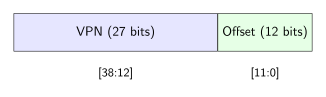
The image shows the 39-bit portion of the VA.
Now you may ask: if our registers are 64 bits wide, what about the upper 25 bits (bits 39 through 63)? In Sv39, these bits must be copies of bit 38 (the most significant bit of the 39-bit address). This is called sign extension. If bit 38 is 0, bits 63:39 must all be 0. If bit 38 is 1, bits 63:39 must all be 1. Any VA that violates this rule causes a page fault (RISC-V International, 2021). This constraint effectively divides the VAS into two regions: a “lower half” (addresses starting with 0x0…) and an “upper half” (addresses starting with 0xFFFFFF…), with a large gap of invalid addresses in between. A more detailed explanation on this will come later in this post (see Why MAXVA is $2^{38}$ instead of $2^{39}$?).
Referring to the image above, we have the virtual page number. A virtual page number (VPN) is the portion of a VA that identifies which page (within the VAS) contains the address. It is essentially an index that tells us “which page” we are referring to.
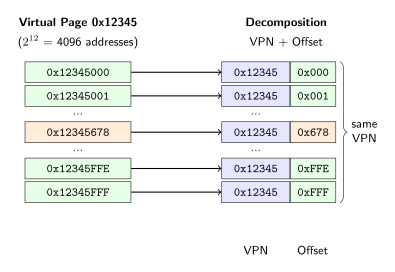
To make this clear: a virtual page is a 4 KiB-aligned, contiguous region of the VAS. Since each page is 4 KiB = $2^{12}$ bytes, there are $2^{12}$ distinct addresses within a single page. All of those addresses share the same VPN but differ in their 12-bit offset. For example, VAs 0x12345000 through 0x12345FFF all belong to virtual page 0x12345 (VPN = 0x12345), with offsets ranging from 0x000 to 0xFFF. Let’s visualize one virtual page:
Now recall that a VPN is 27 bits in our assumed architecture. With 27 bits, we can represent $2^{27}$ distinct page numbers, meaning the VAS can contain up to $2^{27}$ pages. Since each page is $2^{12}$ bytes, this gives us $2^{27} \times 2^{12} = 2^{39}$ bytes, which matches our 39-bit VAS.
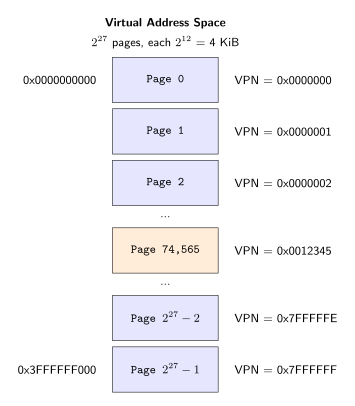
Each box is a page with $2^{12}$ addresses inside it, as visualized in the diagram earlier.
To recap: the 27-bit VPN identifies which page (out of $2^{27}$ possible pages), and the 12-bit offset identifies which byte within that page (out of $2^{12}$ = 4096 bytes).
Now, given the assumed architecture, this means for any program X, there are:
of memory available to X from the point of view (POV) of X (i.e., the VAS of X is 512 GiB):
Process A : 0 to 512 GiB private to A
Process B : 0 to 512 GiB private to B
...
...
You may ask why we emphasized on the phrase POV here? In short, it’s because in reality the physical memory available is far less than 512 GiB (recall we assumed 16 GiB). Each process believes or thinks it has 512 GiB of contiguous memory starting from address 0, but this is an illusion maintained by the page table mechanism. Multiple processes can each have their own 512 GiB VAS, yet they all share the same 16 GiB of physical RAM. The operating system and hardware collaborate to make this work: only the pages a process actually uses need to be backed by physical memory, and different VA’s (from different processes, or even the same process) can map to the same or different physical addresses. This is how great the engineering/idea of virtual memory is.
From here onwards, we will use VA and VAS to abbreviate “Virtual Address” and “Virtual Address Space” respectively. When we use VA’s, we mean its corresponding plural form, i.e: virtual addresses.
Now that we understand VA’s, let’s look at the physical side.
Physical Address (PA), Physical Address Space (PAS), & Physical Page Number (PPN)
So far we’ve talked about virtual addresses, which are the addresses a program uses. But VAs are just numbers in a program’s imagination. At some point, those numbers must correspond to actual bytes in physical RAM chips. That’s where physical addresses come in.
A physical address (PA) is a number that identifies a specific byte location in the actual physical RAM hardware. When the CPU (specifically, the MMU) finishes translating a VA, the result is a PA that gets sent to the memory controller5 to access the actual RAM chips.
A physical address space (PAS) is the complete set of PA’s that can exist in a system. This is determined by the hardware, specifically by how many bits the architecture allocates for PA’s.
In RISC-V Sv39, a PA is 56 bits wide. This means the PAS contains $2^{56}$ possible addresses, which corresponds to:
$$2^{56}\ \text{bytes} = 64\ \text{PiB (pebibytes)}$$of addressable physical memory. No computer today has anywhere near 64 PiB of RAM; as Cox, Kaashoek, & Morris (2025) put it, this is “much more RAM than any computer can currently be equipped with”. The large address space is designed for future expansion.
The structure of a 56-bit PA in Sv39 mirrors the VA structure:
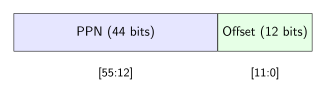
The upper 44 bits form the physical page number (PPN), and the lower 12 bits form the offset within the page. This 12-bit offset is identical to the offset in a VA, which makes sense: once you’ve identified which physical page you’re in, you need to address individual bytes within that 4 KiB page, and $2^{12} = 4096$ gives you exactly that.
With a 44-bit PPN, we can address $2^{44}$ physical pages. Each page is $2^{12}$ bytes, so the total addressable physical memory is:
$$2^{44} \times 2^{12} = 2^{56}\ \text{bytes}$$which matches our 56-bit PA.
A note on terminology: some textbooks use the term physical frame number (PFN) instead of PPN. The idea is to distinguish between “pages” (which are virtual) and “frames” (which are physical). In this framing, a virtual page gets mapped to a physical frame. Both terms refer to the same thing: the upper bits of the address that identify which 4 KiB chunk you’re talking about. The xv6 codebase and the RISC-V specification use “PPN,” so that’s what we’ll use here.
Physical Pages in xv6
A physical page (also called a physical frame) is a 4 KiB-aligned chunk of physical RAM. Each physical page has a PPN that uniquely identifies it.
In xv6’s setup (running on QEMU), physical RAM spans from 0x80000000 to 0x88000000, which is 128 MiB (0x88000000 - 0x80000000 = 0x8000000 = $2^{27}$ bytes). You can see this in kernel/memlayout.h:
#define KERNBASE 0x80000000L
#define PHYSTOP (KERNBASE + 128 * 1024 * 1024)
With 128 MiB of RAM and 4 KiB pages, xv6 has:
$$\frac{128\ \text{MiB}}{4\ \text{KiB}} = \frac{2^{27}}{2^{12}} = 2^{15} = 32768\ \text{physical pages}$$Let’s visualize how these physical pages are organized:
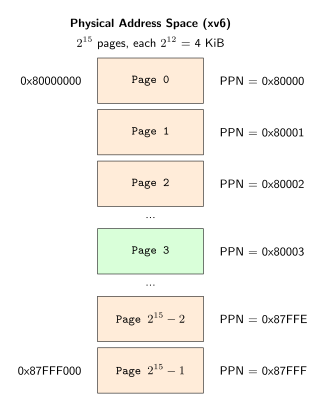
Each box represents a 4 KiB physical page. The PPN is the physical address of the page’s first byte, shifted right by 12 bits (discarding the offset). For example, the page starting at 0x80000000 has PPN 0x80000 (since 0x80000000 >> 12 = 0x80000).
To make the PPN extraction clear: if you have a PA like 0x80003678, the PPN is 0x80003 (upper 44 bits) and the offset is 0x678 (lower 12 bits). This means PA 0x80003678 refers to byte 0x678 within physical page 0x80003, which is the page starting at address 0x80003000.
VAS vs Physical RAM
Now we can appreciate the scale difference between virtual and physical memory. Compare:
| Virtual Address Space (per process) | Physical RAM (xv6) | |
|---|---|---|
| Size | 512 GiB ($2^{39}$ bytes) | 128 MiB ($2^{27}$ bytes) |
| Pages | $2^{27}$ = 134 million pages | $2^{15}$ = 32,768 pages |
| Addresses | 39-bit | 56-bit (but only 27 bits used) |
Each process believes it has 512 GiB of contiguous memory, yet the entire system has only 128 MiB of physical RAM shared among all processes (and the kernel). This is the job of the page table mechanism: it lets each process have its own expansive VAS while the OS carefully allocates the limited physical pages among them. Only the pages a process actually uses need physical backing.
From here onwards, we will use PA and PAS to abbreviate “Physical Address” and “Physical Address Space” respectively. When we use PA’s, we mean its corresponding plural form, i.e: physical addresses.
Page Table
We’ve defined virtual addresses (which programs use) and physical addresses (which identify actual RAM locations). Now we need to understand the data structure that connects these two, and that is the page table.
A page table is a per-process data structure stored in physical memory that maps virtual pages to physical frames. In xv6, each process has its own page table, and the kernel has one too (the kernel needs its own because it also accesses memory via virtual addresses when paging is enabled6).
So what does a page table actually contain? It contains page table entries (PTE’s). A PTE is a 64-bit value that packages together a PPN and a set of permission/status flags. When the hardware translates a VA, it looks up the corresponding PTE, extracts the PPN, and combines it with the offset from the VA to form the final PA. We will explain exactly in more details how this translation process works soon.
The structure of a PTE in RISC-V Sv39 is as follows (RISC-V International, 2021):

Bits 63:54 are reserved. Bits 53:10 store the 44-bit PPN. The lower 10 bits (9:0) are flags that control how the page can be accessed:
| Bit | Name | Description |
|---|---|---|
V |
Valid | If clear, the PTE is invalid and any access causes a page fault. The hardware ignores all other bits when V = 0. |
R |
Readable | If set, loads (reads) to this page are permitted. |
W |
Writable | If set, stores (writes) to this page are permitted. |
X |
Executable | If set, the CPU may fetch and execute instructions from this page. |
U |
User | If set, user-mode code can access this page. If clear, only supervisor mode can access it. |
G |
Global | A TLB optimization hint: if set, this mapping doesn’t need to be flushed from the TLB on context switches (used for kernel pages that are the same across all address spaces). |
A |
Accessed | Set by hardware when the page is read, written, or fetched. |
D |
Dirty | Set by hardware when the page is written. |
RSW |
Reserved | Reserved for supervisor software. The hardware ignores these bits. |
The V bit is the most important: if it’s 0, the translation fails immediately and the CPU raises a page fault. The OS can deliberately leave V = 0 for certain pages and then handle the resulting page fault to implement features like lazy allocation (I cover this in detail in my page faults and lazy allocation post).
A PTE Example
Let’s make this clear with an example. Suppose a PTE has the value 0x0000000020000C07. How do we interpret this?
First, let’s extract the flags (lower 10 bits). We mask with 0x3FF:
Reading from bit 0: V = 1, R = 1, W = 1, X = 0, U = 0, and the rest are 0. So this PTE is valid, readable, writable, not executable, and not user-accessible. Usually something like this looks like a kernel data page.
To extract the PPN, we shift right by 10 bits to discard the flags:
$$\text{PPN} = 0\text{x}0000000020000\text{C}07 \gg 10 = 0\text{x}80003$$This gives us PPN 0x80003. To convert this back to a physical address (the start of the physical page), we shift left by 12:
Why shift left by 12? Recall that a physical address is PPN concatenated with a 12-bit offset. Shifting left by 12 is equivalent to appending 12 zero bits, which gives us the address of the first byte in the page (offset = 0). Put another way, shifting left by 12 is the same as multiplying by $2^{12}$ = 4096, converting a page number into a byte address: page 0x80003 starts at byte 0x80003 × 4096 = 0x80003000.
So this PTE maps some virtual page to physical page 0x80003, which starts at physical address 0x80003000. If you’re wondering how the hardware finds this PTE given a virtual address, that’s exactly what the translation process is about, and we’ll see diagrams illustrating the full picture in the next section.
xv6 defines macros for these operations in kernel/riscv.h:
// shift a physical address to the right place for a PTE.
#define PA2PTE(pa) ((((uint64)pa) >> 12) << 10)

#define PTE2PA(pte) (((pte) >> 10) << 12)

#define PTE_FLAGS(pte) ((pte) & 0x3FF)
PA2PTE(pa) takes a physical address, shifts right by 12 to get the PPN, then shifts left by 10 to position it correctly in a PTE (leaving room for the 10 flag bits). PTE2PA(pte) does the reverse: shifts right by 10 to extract the PPN, then shifts left by 12 to get the physical address. PTE_FLAGS(pte) masks off the lower 10 bits to get just the flags.
Permission Bits in Practice
The R, W, X bits enforce memory protection. For example, xv6 maps kernel code with R and X but not W, so any attempt to write to kernel code causes a fault. You can see this in kernel/vm.c where kvmmake() sets up the kernel page table:
// map kernel text executable and read-only.
kvmmap(kpgtbl, KERNBASE, KERNBASE, (uint64)etext - KERNBASE, PTE_R | PTE_X);

// map kernel data and the physical RAM we'll make use of.
kvmmap(kpgtbl, (uint64)etext, (uint64)etext, PHYSTOP - (uint64)etext, PTE_R | PTE_W);
Kernel text (code) gets PTE_R | PTE_X (readable and executable, but not writable). Kernel data gets PTE_R | PTE_W (readable and writable, but not executable). This separation prevents accidental (or malicious) modification of kernel instructions.
The U bit is what enforces the user/kernel boundary. User pages have U = 1; kernel pages have U = 0. When the CPU is in user mode and tries to access a page with U = 0, it faults. This is how the hardware prevents user programs from reading or writing kernel memory.
xv6 defines the flags it uses in kernel/riscv.h:
#define PTE_V (1L << 0) // valid
#define PTE_R (1L << 1)
#define PTE_W (1L << 2)
#define PTE_X (1L << 3)
#define PTE_U (1L << 4) // user can access
The G, A, and D bits exist in hardware but xv6 doesn’t use them. A real OS might use A and D to implement page replacement policies (evict pages that haven’t been accessed recently, or write dirty pages to disk before evicting them).
From here onwards, we will use PTE to abbreviate “Page Table Entry”. When we use PTE’s, we mean its corresponding plural form, i.e: page table entries.
Translation Process for Flat Table Design
We’ve now defined virtual addresses, physical addresses, and page table entries. Let’s see how the hardware uses these pieces to translate addresses. We’ll start with a conceptual design called the flat table (or single-level page table), which is simpler to understand but has significant drawbacks that motivate the multi-level design used in practice.
In a flat table design, the page table is a single, contiguous array of PTE’s stored in physical memory. The VPN from a virtual address directly indexes into this array to find the corresponding PTE. It’s called “flat” because the entire mapping from all possible virtual pages to physical pages lives in one level of indirection, one array, rather than being split across multiple levels of tables. We’ll see a nice visualization diagram soon, don’t worry.
The base address of this array (i.e., the physical address where the page table starts) is stored in the satp register (a CPU control register that tells the hardware where to find the page table).7 When a CPU core needs to translate a VA, it reads satp to find the page table, then uses the VA to index into it.
Before walking through the steps, let’s set the scene. Suppose a process X is currently running on a CPU core. Before the kernel switched to X, it loaded X’s page table base address into the satp register. Now X is executing its code, and it reaches an instruction that accesses memory.
Now, let’s take a look at the translation process step by step.
Step 1: CPU generates a VA.
When the CPU executes an instruction that accesses memory (e.g., a load instruction like ld a0, 0(a1) where a1 contains some address), it needs to translate the VA to a PA before it can actually read from physical RAM. This translation is performed by the MMU (as we introduced earlier). Let’s say the VA is 0x0000000012345678.
Step 2: Check canonical form.
Before proceeding, the MMU checks that the VA is in canonical form: bits 63:39 must all equal bit 38 (see Why MAXVA is $2^{38}$ instead of $2^{39}$? for why this requirement exists). For our VA 0x0000000012345678, bit 38 is 0, and bits 63:39 are all 0, so it’s valid. If this check fails, the MMU raises a page fault immediately.
Step 3: Extract VPN and Offset from the VA.
As we discussed earlier, the VA is split into two parts:
$$\text{VPN} = \text{VA}[38:12] = \text{VA} \gg 12$$$$\text{Offset} = \text{VA}[11:0] = \text{VA}\ \And\ 0\text{xFFF}$$For VA = 0x12345678:
- VPN =
0x12345678 >> 12=0x12345 - Offset =
0x12345678 & 0xFFF=0x678
Again, recall that the VPN tells us which virtual page we’re accessing and the offset tells us which byte within that page.
Step 4: Compute the address of the PTE.
The page table is an array of PTE’s. Recall that each PTE is 8 bytes (64 bits). To find the PTE for our virtual page, we use the VPN as an index into this array:
$$\text{PTE}\_\text{addr} = \text{PageTableBase} + (\text{VPN} \times 8)$$We multiply by 8 because each PTE occupies 8 bytes, so the byte offset of the VPN-th entry is VPN × 8. The PageTableBase comes from the satp register. Suppose satp indicates the page table starts at physical address 0x80100000. Then:
Step 5: Read the PTE from physical memory.
The MMU reads 8 bytes from physical address 0x80191A28:
Suppose this read returns 0x0000000020000C07. This is the same PTE we analyzed in the earlier example (this is intentional, so you can connect what we learned about PTE structure to how it’s used in translation). The kernel set up this PTE beforehand when it created the process’s address space. The kernel knows physical addresses (it uses identity mapping, so its VAs equal PAs; see Who knows physical addresses?), and it’s the kernel’s job to build page tables that map user VAs to physical pages. As we computed earlier, the low 10 bits (0x007 = 0b0000000111) indicate that V, R, and W (bits 0, 1, 2) are set, meaning the page is valid, readable, and writable. The upper bits encode the PPN, which we’ll extract in Step 7.
Step 6: Check the Valid bit.
As we discussed when introducing PTE flags, the MMU examines bit 0 of the PTE (the V flag):
For our PTE 0x0000000020000C07, bit 0 is 1, so the entry is valid. If Valid = 0, the MMU raises a page fault and translation stops here.
Step 7: Extract the PPN from the PTE.
The PPN occupies bits 53:10 of the PTE, which is a 44-bit field. To extract it, we shift right by 10 to discard the flag bits:
$$\text{PPN} = \text{PTE} \gg 10$$For PTE = 0x0000000020000C07:
(The reserved bits 63:54 are required by the RISC-V specification to be zero, so shifting alone suffices. xv6’s PTE2PA macro also relies on this: it just shifts without masking.)
Step 8: Construct the PA.
The PA is formed by concatenating the PPN with the Offset:
$$\text{PA} = (\text{PPN} \ll 12)\ |\ \text{Offset}$$For PPN = 0x80003 and Offset = 0x678:
Step 9: Access physical memory.
Finally, the MMU sends PA 0x80003678 to the memory controller (as we mentioned in the PA section), which performs the actual memory access, reading from or writing to the physical RAM at that address.
The following diagram illustrates this process (adapted from Figure 3.1 in Cox, Kaashoek, & Morris, 2025):
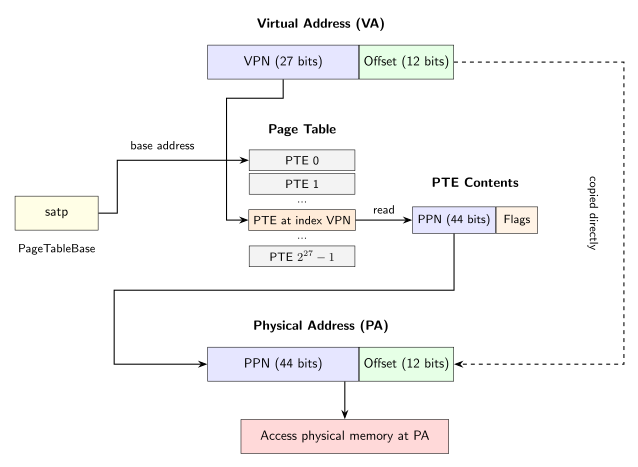
A clarification on what exists where: the only data structure in the diagram that actually resides in physical memory is the Page Table (and the PTE Contents box is just showing what we read from it). The VA is not “stored” anywhere during translation; it’s the address the CPU is trying to translate, originating from an instruction operand or the program counter. The satp register is a CPU register, not RAM. The PA is not stored either; it’s the result computed by the MMU. The final box, “Access physical memory at PA”, represents the actual memory operation (read or write) that occurs at the computed physical address.
To summarize: the program tried to access VA 0x12345678. The MMU looked up virtual page 0x12345 in the page table, found that it maps to physical page 0x80003, and accessed byte 0x678 within that physical page, yielding PA 0x80003678.
Notice that the 12-bit Offset passes through unchanged from VA to PA. This is because both virtual and physical pages are 4 KiB ($2^{12}$ bytes), so once we know which physical page corresponds to a virtual page, the byte position within the page is the same. This is a direct consequence of the page alignment requirement we discussed in the Page section.
This also means that all virtual addresses sharing the same VPN (differing only in their 12-bit offset) are translated through the same PTE. VA 0x12345000 and VA 0x12345FFF both have VPN 0x12345, so they both use the same PTE; only the offset differs. Since the offset can take $2^{12}$ = 4096 values, one PTE covers 4 KiB of virtual address space.
Where Do Pages Fit In?
At this point you might be wondering: where is the “page” we defined earlier? We’ve been talking about translation, PTEs, PPNs, but where exactly is the page?
Recall that a page is a 4 KiB chunk of memory. As we have discussed, both virtual and physical address spaces are divided into pages:
-
A virtual page is a 4 KiB chunk in the virtual address space. The VPN (Virtual Page Number) identifies which virtual page we’re talking about. Virtual pages don’t “exist” physically; they’re just how we partition the virtual address space.
-
A physical page (also called a frame) is a 4 KiB chunk in physical RAM. The PPN (Physical Page Number) identifies which physical page we’re talking about. Physical pages are actual, tangible 4 KiB regions of RAM hardware.
We can revisit the walkthrough from earlier, this time thinking in terms of pages. When the MMU translates VA 0x12345678 to PA 0x80003678:
- The VA belongs to virtual page
0x12345(VPN = VA >> 12) - The page table says virtual page
0x12345maps to physical page0x80003 - Physical page
0x80003starts at address0x80003000(PPN << 12) and spans to0x80003FFF - The offset
0x678tells us which byte within that 4 KiB physical page
So the PA 0x80003678 points to byte 0x678 within physical page 0x80003.
Now, this is obvious but I’m going to state this explicitly anyways: everything lives in the same physical RAM. The page table itself is stored in physical RAM. The process’s code and data occupy physical pages in RAM. The kernel’s code and data occupy physical pages in RAM. Every process’s page table and pages all coexist in the same physical memory.
Physical RAM is just a big pool of bytes. The OS (via kalloc() in xv6) carves it up into 4 KiB pages and hands them out for various purposes:
| What | Where It Lives |
|---|---|
| Process A’s page table | Some physical pages in RAM |
| Process A’s code/data | Some physical pages in RAM |
| Process B’s page table | Some physical pages in RAM |
| Process B’s code/data | Some physical pages in RAM |
| Kernel’s page table | Some physical pages in RAM |
| Kernel’s code/data | Some physical pages in RAM |
All from the same pool. The isolation between processes is enforced by giving each process its own page table that only maps to that process’s physical pages. Process A’s page table doesn’t contain mappings to Process B’s physical pages, so A cannot address B’s memory even if they’re neighbors in physical RAM.
The Issue with Flat Table Design
Notice how the flat table design is conceptually clean, but it is really really bad in terms of memory consumption.
Recall that in Sv39, each process has a 39-bit VAS, which is $2^{39}$ bytes = 512 GiB. Since each virtual page is 4 KiB ($2^{12}$ bytes), the number of virtual pages in the VAS is:
$$\frac{2^{39}}{2^{12}} = 2^{27}\ \text{virtual pages}$$That’s roughly 134 million pages. A flat page table needs one PTE for every possible virtual page, regardless of whether that page is actually used. Since each PTE is 8 bytes (64 bits), a single flat page table would require:
$$2^{27} \times 8\ \text{bytes} = 2^{30}\ \text{bytes} = 1\ \text{GiB}$$Every process would need 1 GiB of physical memory just for its page table. And recall that most of the VAS is typically unused. A typical user program might use a few megabytes of memory, but we’d need 1 GiB to store the page table that describes that address space. Most of those $2^{27}$ PTE’s would have PTE_V = 0, indicating “no mapping here”, but we’d still need to store them.
In xv6’s setup with 128 MiB of total RAM, we couldn’t even create a single process. The page table alone would exceed all available memory.
This is why the flat table is just an abstraction; implementation-wise nobody uses it. In actual systems, including RISC-V Sv39, use multi-level page tables that only allocate page table pages for regions of the VAS that are actually in use. We will explore this in the next section.
Sv39 Three-Level Design
The idea of multi-level page tables design is as follows: instead of one massive array with an entry for every possible virtual page, use a tree structure where we only allocate nodes for the parts of the address space that are actually in use.
In Sv39, the 27-bit VPN is split into three 9-bit indices as shown in the diagram below. You can think of a level as a layer in a tree of page tables. Instead of one massive flat array (like the flat table design), Sv39 organizes page tables into a three-level tree. The root of the tree is at Level 2 (L2), and we descend through Level 1 (L1) to Level 0 (L0), which contains the final mappings. Each VPN component indexes into its corresponding level: VPN[2] indexes into L2, VPN[1] indexes into L1, and VPN[0] indexes into L0. We’ll see exactly how this works shortly, but for now, understand that each “level” is a separate page table in the hierarchy.
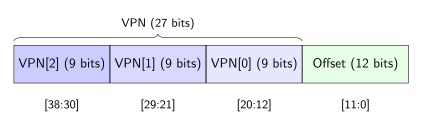
Each 9-bit index can represent $2^9 = 512$ values, so each level of the page table contains exactly 512 entries. Since each PTE is 8 bytes, a page table at any level is $512 \times 8 = 4096$ bytes, which is exactly one 4 KiB page:
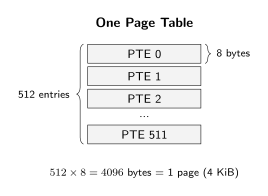
As you can see, the design ensures that page tables themselves are page-sized and page-aligned, which simplifies allocation (just use kalloc()).
To reiterate, the Sv39 structure forms a tree with three levels:
- Level 2 (L2): The root page table. The
satpregister points here. Contains 512 PTEs. - Level 1 (L1): Intermediate page tables. Each L2 PTE can point to one L1 table.
- Level 0 (L0): Leaf page tables. Each L1 PTE can point to one L0 table. The PTEs here contain the actual physical page mappings.
The following diagram shows how these levels connect during translation:
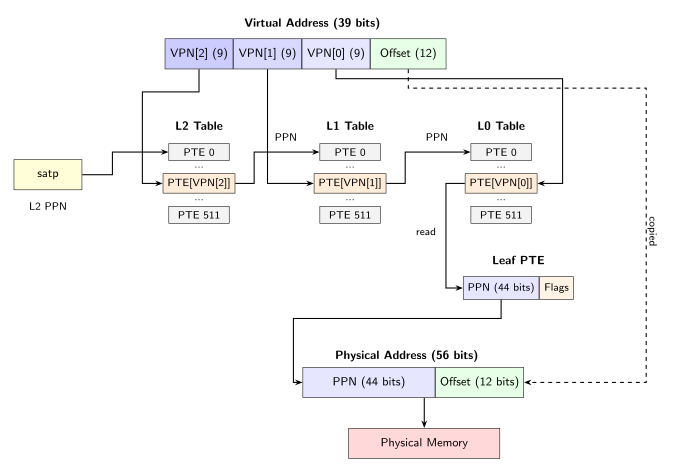
The satp register contains the PPN of the L2 (root) table. Each VPN component indexes into its respective level:
- VPN[2] selects an entry in L2, which points to an L1 table;
- VPN[1] selects an entry in L1, which points to an L0 table;
- VPN[0] selects an entry in L0, which is a leaf PTE containing the final PPN.
Then, the 12-bit offset passes through unchanged to form the final PA.
As with the flat table diagram: the L2, L1, and L0 tables are the only data structures that actually reside in physical memory. The VA and its VPN components are not “stored” anywhere; they’re the address being translated. The satp register is a CPU register, not RAM. The Leaf PTE box shows what we read from the L0 table. The final PA is computed by combining the PPN from the leaf PTE with the offset.
Let’s work through an example to see how VPN extraction works. Consider VA 0x0000003FABCDE678. To extract VPN[2], VPN[1], VPN[0], and the offset, we need to look at the binary representation of the 39-bit address:
VA = 0x3FABCDE678 (showing only the lower 39 bits)

Binary:  0 1111 1110  1 0101 1110  0 1101 1110  0110 0111 1000
         |---------|  |---------|  |---------|  |------------|
            VPN[2]       VPN[1]       VPN[0]        Offset
         bits 38:30   bits 29:21   bits 20:12     bits 11:0
Reading each 9-bit chunk as a number:
- VPN[2] =
0 1111 1110= 0x0FE = 254 - VPN[1] =
1 0101 1110= 0x15E = 350 - VPN[0] =
0 1101 1110= 0x0DE = 222 - Offset =
0110 0111 1000= 0x678
To extract these programmatically, we shift the VA right to move the desired bits to the bottom, then mask off 9 bits (or 12 for the offset). xv6 defines macros in kernel/riscv.h for this:
#define PXMASK          0x1FF // 9 bits of 1's
#define PXSHIFT(level)  (PGSHIFT + (9 * (level)))
#define PX(level, va)   ((((uint64)(va)) >> PXSHIFT(level)) & PXMASK)
PGSHIFT is 12 (the offset size). For VPN[0], we shift right by 12 to skip the offset bits. For VPN[1], we shift right by 21 (12 + 9) to skip past both the offset and VPN[0]. For VPN[2], we shift right by 30 (12 + 18) to skip past offset, VPN[0], and VPN[1]. After shifting, we mask with 0x1FF to keep only the bottom 9 bits.
To translate this VA, the hardware would:
- Use VPN[2], which is 254, as an index into the L2 table
- Use VPN[1], which is 350, as an index into the L1 table found in step 1
- Use VPN[0], which is 222, as an index into the L0 table found in step 2
- Extract the PPN from the L0 PTE and combine it with the offset
How This Solves the Memory Problem
Recall that a flat table requires $2^{27}$ PTEs (1 GiB) per process, regardless of how much memory the process actually uses. The three-level design changes this significantly. Let’s work through an example to verify this claim.
Consider a process that uses only the first 4 MiB of its address space for code and data. How many page table pages do we need?
First, how many virtual pages is 4 MiB? Since each page is 4 KiB:
$$\frac{4\ \text{MiB}}{4\ \text{KiB}} = \frac{2^{22}}{2^{12}} = 2^{10} = 1024\ \text{pages}$$These 1024 pages occupy VAs from 0x00000000 to 0x003FFFFF (since 4 MiB = 0x400000 bytes, and the last valid address is 0x400000 - 1 = 0x3FFFFF). Their VPNs range from 0 to 1023 (since VPN = VA » 12, and 0x3FFFFF >> 12 = 0x3FF = 1023).
Now, how do these VPNs decompose into the three indices? Let’s check a few representative values:
| VPN | VPN[2] | VPN[1] | VPN[0] |
|---|---|---|---|
| 0 | 0 | 0 | 0 |
| … | … | … | … |
| 511 | 0 | 0 | 511 |
| 512 | 0 | 1 | 0 |
| … | … | … | … |
| 1023 | 0 | 1 | 511 |
Notice the pattern: all 1024 VPNs have VPN[2] = 0. This means they all index into the same L2 entry, namely L2[0]. The OS only needs to allocate one L1 table (the one that L2[0] points to). Entries L2[1] through L2[511] are unused, so we don’t allocate any L1 tables for them.
Within that L1 table, VPN[1] is either 0 or 1:
- VPNs 0-511 have VPN[1] = 0, so they go through L1[0]
- VPNs 512-1023 have VPN[1] = 1, so they go through L1[1]
The page table structure is a tree, so there can be multiple tables at each level. Each L1 entry that’s used points to its own separate L0 table. Since L1[0] and L1[1] are both used, we need two L0 tables:
- L1[0] points to L0 Table #1 (512 entries, handling VPNs 0-511)
- L1[1] points to L0 Table #2 (512 entries, handling VPNs 512-1023)
Each L0 table is a separate 4 KiB page with 512 entries. Entries L1[2] through L1[511] are unused, so we don’t allocate L0 tables for them.
The following diagram shows which entries are used (green) versus unused (gray):
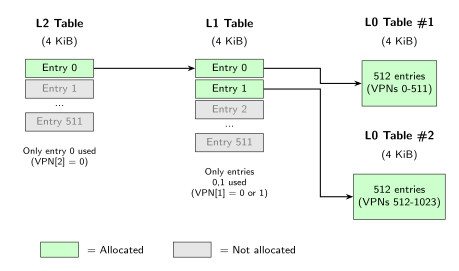
The total page table memory:
- 1 L2 table (the root, always needed): 4 KiB
- 1 L1 table (pointed to by L2[0]): 4 KiB
- 2 L0 tables (pointed to by L1[0] and L1[1]): 4 KiB + 4 KiB = 8 KiB
Total: 16 KiB, compared to 1 GiB for a flat table. Thus, we see that the savings come from not allocating page tables for unused branches of the tree.
Pointer PTEs vs Leaf PTEs
We’ve now seen how the three-level tree structure saves memory by only allocating page tables for regions that are actually in use. But there’s a question we glossed over in the translation diagrams: when the hardware walks the tree, how does it know whether a PTE points to another page table or contains the final physical address?
Consider the translation process we described earlier. At L2, the hardware reads a PTE and follows the PPN to an L1 table. At L1, it reads another PTE and follows its PPN to an L0 table. At L0, it reads a third PTE and extracts the final PPN. But PTEs at all levels have the same 64-bit format with the same fields (PPN in bits 53:10, flags in bits 9:0), no? So how does the hardware distinguish “this PPN points to another page table” from “this PPN is the final physical page”?
To figure this out, the hardware utilizes the permission bits. A pointer PTE (also called a non-leaf PTE) points to the next level of the page table. A leaf PTE contains the actual VA → PA mapping. The RISC-V specification (RISC-V International, 2021) defines the following rule:
If
PTE_V = 1andPTE_R = PTE_W = PTE_X = 0, the PTE is a pointer to the next level of the page table. Otherwise, it is a leaf PTE.
Basically the idea is as follows: a page with no read, write, or execute permissions would be useless as a final mapping. You couldn’t do anything with such a page. So if a valid PTE has R = W = X = 0, that combination signals “I’m a pointer, follow me to the next level”. If a valid PTE has at least one of R, W, or X set, that signals “I’m a leaf, the translation ends here”.
Let’s work through an example. Suppose during translation we read a PTE with value 0x0000000020001401. Decoding this:
-
Check the valid bit:
0x...401 & 0x001= 1. The PTE is valid. -
Check permission bits:
0x...401 & 0x00E(bits 1-3, which are R, W, X) = 0. No read, write, or execute permissions.
Since the PTE is valid but has no permission bits set, this is a pointer PTE. The PPN field (0x0000000020001401 >> 10 = 0x80005) gives us the physical address of the next-level page table: 0x80005 << 12 = 0x80005000. The hardware will continue the walk from there.
Now suppose we read a different PTE with value 0x0000000020000C07. Let’s decode this one:
-
Check the valid bit:
0x...C07 & 0x001= 1. Valid. -
Check permission bits:
0x...C07 & 0x00E=0x006=0b110. Both R (bit 1) and W (bit 2) are set.
Since at least one permission bit is set, this is a leaf PTE. The translation ends here. The PPN (0x0000000020000C07 >> 10 = 0x80003) is the final physical page, not another page table.
This is why walk() in xv6 only checks PTE_V when descending levels, but not when returning the final PTE. At intermediate levels (L2 and L1), we’re looking for pointers, and we know they’re pointers because we haven’t reached L0 yet (the loop structure enforces this). At L0, whatever we find is necessarily a leaf.
We can see the pointer/leaf distinction in xv6’s freewalk() function. But to understand what this function does, we first need to understand the problem it solves.
The problem is as follows: when a process terminates, the kernel must return all the physical memory that process was using back to the free list.8 But what physical pages was the process using? There are two distinct categories:
-
Page table pages. The L2, L1, and L0 tables are themselves physical pages. Each table is a 4 KiB page containing 512 PTEs. These pages were allocated (via
kalloc()) when the kernel built the process’s page table (we will talk about how xv6 build page tables later in this post). -
Mapped pages. These are the physical pages that leaf PTEs point to. They contain the process’s actual content: code, stack, heap, etc. These pages were also allocated via
kalloc(), but they serve a completely different purpose from page table pages.
What I mean is as follows; suppose a simple process has:
- An L2 table at physical address
0x80100000 - An L1 table at
0x80101000(L2 has a pointer PTE to this) - An L0 table at
0x80102000(L1 has a pointer PTE to this) - User code at
0x80200000(L0 has a leaf PTE pointing here)
That’s four physical pages total: three page table pages (L2, L1, L0) and one mapped page (user code). When the process exits, all four must be freed.
xv6 handles this cleanup in two steps, which you can see in uvmfree() in kernel/vm.c:
void
uvmfree(pagetable_t pagetable, uint64 sz)
{
  if (sz > 0)
    uvmunmap(pagetable, 0, PGROUNDUP(sz) / PGSIZE, 1);
  freewalk(pagetable);
}
Step 1: uvmunmap() frees the mapped pages. It walks through the process’s address space, finds each leaf PTE, calls kfree() on the physical page that leaf points to, and then clears the PTE (sets it to 0, making it invalid). In our example, this frees 0x80200000 and clears the leaf PTE in the L0 table.
Step 2: freewalk() frees the page table pages. After uvmunmap() finishes, the page table tree still exists (L2, L1, L0 are still allocated), but all leaf PTEs have been cleared. Only pointer PTEs remain. freewalk() recursively walks this tree and frees each page table page. In our example, this frees 0x80102000 (L0), 0x80101000 (L1), and 0x80100000 (L2).
Okay, now we can understand freewalk():
void
freewalk(pagetable_t pagetable)
{
  for (int i = 0; i < 512; i++) {
    pte_t pte = pagetable[i];
    if ((pte & PTE_V) && (pte & (PTE_R | PTE_W | PTE_X)) == 0) {
      // this PTE points to a lower-level page table.
      uint64 child = PTE2PA(pte);
      freewalk((pagetable_t)child);
      pagetable[i] = 0;
    } else if (pte & PTE_V) {
      panic("freewalk: leaf");
    }
  }
  kfree((void *)pagetable);
}
The function receives a page table (a pointer to a 4 KiB page containing 512 PTEs). It iterates through all 512 entries and checks each one:
Case 1: Pointer PTE (condition: (pte & PTE_V) && (pte & (PTE_R | PTE_W | PTE_X)) == 0). The PTE is valid but has no permission bits, so it points to a child page table. The function extracts the child’s address with PTE2PA(pte), recursively calls itself on that child table, then sets the PTE to 0 (here, I think the zeroing is somewhat redundant? Since we’re about to free this page anyway. I guess this is just defensive programming).
Case 2: Leaf PTE (condition: pte & PTE_V with permission bits set). The function panics. Why? Because freewalk() expects uvmunmap() to have already cleared all leaf PTEs. If a leaf PTE still exists, that means uvmunmap() wasn’t called first, or it missed something. The mapped page would leak (never freed). The panic catches this bug.
Case 3: Invalid PTE (PTE_V = 0). Nothing to do. This entry doesn’t point to anything.
After processing all 512 entries, the function calls kfree() on the page table page itself, returning it to the free list.
The recursion naturally handles the tree structure (if you’ve done a bunch of tree problems in leetcode, high chance you’ve done so much recursion already and it should be clear why tree and recursion are best friends). Starting at L2, it finds pointer PTEs to L1 tables, recurses into each L1, which finds pointer PTEs to L0 tables, recurses into each L0, finds no pointer PTEs (L0 only has leaves, which should now be cleared), and unwinds, freeing L0 pages, then L1 pages, then finally the L2 page.
Superpages
A superpage (also called a huge page or large page) is a memory mapping larger than the standard 4 KiB page. Instead of mapping 4 KiB of virtual address space to 4 KiB of physical memory, a superpage maps a larger contiguous region (2 MiB or 1 GiB in Sv39) using a single PTE. But how do we achieve this? By leveraging the distinction between pointer and leaf PTEs from our discussion earlier.
So far, we’ve assumed that leaf PTEs only appear at L0, mapping 4 KiB pages. But the rule we described earlier, “a valid PTE with any R, W, or X bit set is a leaf”, applies at every level, not just L0. This means a PTE at L1 or L2 can also be a leaf.
Why would we want this? Consider what happens when an L1 PTE is a leaf instead of a pointer. Normally, the L1 PTE points to an L0 table. That L0 table has 512 entries, and each entry (when valid) maps one 4 KiB page (remember the physical pages diagram: each box is one physical page, 4 KiB, identified by a PPN. And recall from the flat table translation section: all VAs sharing the same VPN use the same PTE, so one PTE covers 4 KiB. Don’t confuse the entry size, 8 bytes, with the region it maps, 4 KiB). So one L0 table covers $512 \times 4$ KiB = 2 MiB of virtual address space. If we make the L1 PTE a leaf instead, we skip the L0 table entirely, and that single L1 PTE maps the entire 2 MiB region to a single contiguous 2 MiB physical region.
Similarly, an L2 leaf PTE skips both L1 and L0, mapping $512 \times 512 \times 4$ KiB = 1 GiB with a single PTE.
The sizes follow from the tree structure:
| Leaf Level | Region Size | Calculation |
|---|---|---|
| L0 | 4 KiB | $2^{12}$ bytes (one page) |
| L1 | 2 MiB | $512 \times 4$ KiB = $2^{9} \times 2^{12}$ = $2^{21}$ bytes |
| L2 | 1 GiB | $512 \times 512 \times 4$ KiB = $2^{9} \times 2^{9} \times 2^{12}$ = $2^{30}$ bytes |
The following diagram illustrates how translation differs for superpages versus regular pages:
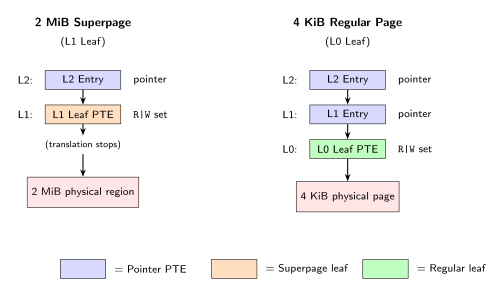
For a 2 MiB superpage, translation stops at L1. The hardware reads the L1 PTE, sees that R, W, or X is set, and recognizes this as a leaf. But the difference from a regular L0 leaf is that the offset within the physical region is larger.
In regular translation (L0 leaf), the 12-bit page offset from the VA tells us which byte within the 4 KiB page. But when we stop at L1, we’ve skipped the L0 level entirely. The bits that would have been VPN[0] (9 bits) plus the original offset (12 bits) now all become the offset within the 2 MiB region. That’s 21 bits of offset, which addresses $2^{21}$ = 2 MiB, exactly matching the superpage size.
Similarly, for a 1 GiB gigapage (L2 leaf), we skip both L1 and L0. The bits that would have been VPN[1], VPN[0], and offset (9 + 9 + 12 = 30 bits) all become the offset within the 1 GiB region.
| Leaf Level | Offset Bits | Offset Size |
|---|---|---|
| L0 (regular) | VA[11:0] | 12 bits = 4 KiB |
| L1 (megapage) | VA[20:0] | 21 bits = 2 MiB |
| L2 (gigapage) | VA[29:0] | 30 bits = 1 GiB |
Alignment requirements: for this offset scheme to work, the physical region must be aligned to its size. A 2 MiB superpage must start at a 2 MiB boundary (physical address divisible by $2^{21}$). A 1 GiB gigapage must start at a 1 GiB boundary (divisible by $2^{30}$).
Why? Consider what happens if alignment is violated. Suppose we try to map a 2 MiB superpage starting at physical address 0x82100000 (not 2 MiB-aligned; note bit 20 is set). The PPN would be 0x82100000 >> 12 = 0x82100. Now suppose we want to access byte 0x100000 within this superpage (halfway through the 2 MiB region). We expect PA = 0x82100000 + 0x100000 = 0x82200000. But the hardware computes PA = (0x82100 << 12) | 0x100000 = 0x82100000 | 0x100000 = 0x82100000. The offset bits were absorbed because the base address already had bit 20 set. The OR didn’t add anything; it just returned the base. We wanted byte 0x100000 of the region but got byte 0 instead.
The RISC-V specification requires alignment. In particular: for a leaf PTE at level $i$, the PPN bits below level $i$ must be zero. If they’re not, the hardware raises a page fault. For L1 leaves, PPN[8:0] must be zero (9 bits). For L2 leaves, PPN[17:0] must be zero (18 bits).
Let’s take a look at an example. Suppose we have a 2 MiB superpage mapping VA range 0x00200000 to 0x003FFFFF (exactly 2 MiB starting at the 2 MiB mark) to physical range 0x82000000 to 0x821FFFFF. The L1 leaf PTE would contain:
- PPN =
0x82000000 >> 12=0x82000 - Note:
0x82000in binary is1000 0010 0000 0000 0000. The lower 9 bits are zero, satisfying alignment. - Flags =
PTE_V | PTE_R | PTE_W(or whatever permissions are needed)
When translating VA 0x00300ABC:
- Extract VPN[2] =
(0x00300ABC >> 30) & 0x1FF= 0. Index into L2, find a pointer PTE. - Follow the pointer to L1. Extract VPN[1] =
(0x00300ABC >> 21) & 0x1FF= 1. Index into L1, find a leaf PTE (hasR|Wset). - Hardware sees this is a leaf at L1. Translation stops.
- Compute offset: VA[20:0] =
0x00300ABC & 0x1FFFFF=0x100ABC(the lower 21 bits). - Compute PA:
(PPN << 12) | offset=(0x82000 << 12) | 0x100ABC=0x82000000 | 0x100ABC=0x82100ABC.
The result 0x82100ABC is within our 2 MiB physical region (0x82000000 to 0x821FFFFF).
Now you may ask: why would an OS use superpages? Two main reasons:
-
TLB efficiency. We will talk about TLB in more details in the coming section but essentially, the TLB has limited entries. Each entry caches one VA → PA translation. With 4 KiB pages, mapping 1 GiB requires 262,144 TLB entries (which no TLB in existence, as far as I know, can hold). With 1 GiB superpages, that same 1 GiB requires just one TLB entry. Fewer TLB misses means faster memory access.
-
Page table memory savings. Mapping 1 GiB with 4 KiB pages requires 262,144 L0 PTEs across 512 L0 tables, plus L1 and L2 tables. That’s hundreds of page table pages. A single 1 GiB superpage requires just the L2 PTE, no L1 or L0 tables at all.
xv6 doesn’t use superpages, keeping the implementation simple. But real operating systems use them extensively. Linux, for example, uses 1 GiB superpages for the kernel’s identity mapping of physical memory (since the kernel maps all of RAM and rarely needs fine-grained control over individual 4 KiB pages in that region). Applications can also request huge pages via mmap() with MAP_HUGETLB for large buffers like database caches, scientific computing arrays, or low-latency trading systems where every TLB miss costs precious nanoseconds.9
If you’re taking MIT 6.1810, one of the lab assignments asks you to implement superpage support in xv6. The task involves modifying sbrk() to use 2 MiB superpages when a process requests at least 2 MiB of 2 MiB-aligned memory. You’ll need to create superalloc() and superfree() functions in kalloc.c, modify uvmcopy() and uvmunmap() to handle superpages, and handle the tricky case of “demoting” a superpage back to regular pages when sbrk() partially frees it. The concepts we’ve covered here (pointer vs leaf PTEs, alignment requirements, how the hardware determines page size from the leaf level, etc.) should be helpful :)
Three-Level Address Translation
Now that we understand superpages (where translation can terminate early at L2 or L1), let’s walk through the standard case: a complete three-level translation to a regular 4 KiB page. This is the hardware’s perspective, i.e.: given a page table structure, how does the MMU translate a VA to a PA?
We’ll use the same VA from earlier: 0x0000003FABCDE678. Recall that we already extracted the VPN components:
- VPN[2] = 254 =
0x0FE - VPN[1] = 350 =
0x15E - VPN[0] = 222 =
0x0DE - Offset =
0x678
Let’s trace through what happens when the CPU accesses this address.
Step 1: CPU generates a VA.
As with the flat table translation, the CPU executes an instruction that accesses memory. Suppose the instruction is ld a0, 0(a1) where a1 contains 0x0000003FABCDE678. The CPU needs to translate this VA to a PA before it can read from physical RAM.
Step 2: Check canonical form.
The MMU verifies that bits 63:39 are all copies of bit 38. For our VA, bit 38 is 0 (since 0x3FABCDE678 is less than $2^{38}$), and the upper bits are all 0, so the address is canonical. If this check fails, the MMU raises a page fault immediately without attempting any page table walk.
Step 3: Read the root page table address from satp.
The satp register contains the PPN of the L2 (root) page table. Suppose satp indicates the L2 table is at physical address 0x80200000. The MMU will start the page table walk from this address.
Step 4: Compute the L2 PTE address and read it.
VPN[2] (254) indexes into the L2 table. Since each PTE is 8 bytes, the address of the L2 PTE is:
$$\text{L2-PTE-addr} = 0\text{x}80200000 + (254 \times 8)$$$$= 0\text{x}80200000 + 0\text{x}7F0 = 0\text{x}802007F0$$
The MMU reads 8 bytes from physical address 0x802007F0. This is the first memory access during translation. Suppose this read returns:
Step 5: Check the L2 PTE.
The MMU examines the PTE to determine what to do next. First, it checks the valid bit:
$$\text{L2}\_\text{PTE}\ \And\ 1 = 0\text{x}...401\ \And\ 1 = 1$$The entry is valid. Next, the MMU checks whether this is a pointer PTE or a leaf PTE by examining the permission bits (R, W, X in bits 1, 2, 3):
$$\text{L2}\_\text{PTE}\ \And\ 0\text{xE} = 0\text{x}...401\ \And\ 0\text{xE} = 0$$All permission bits are 0. As we discussed in the Pointer PTEs vs Leaf PTEs section, a valid PTE with R = W = X = 0 is a pointer PTE. This means the PPN field points to an L1 page table, not a physical page.
If the permission bits were non-zero, this would be a leaf PTE (a 1 GiB superpage), and translation would end here. But since they’re all 0, we continue to L1.
Step 6: Extract the L1 table address from the L2 PTE.
The L2 PTE’s PPN field (bits 53:10) tells us where the L1 table is located:
$$\text{L1}\_\text{base} = (\text{L2}\_\text{PTE} \gg 10) \ll 12$$$$= (0\text{x}...20080401 \gg 10) \ll 12 = 0\text{x}80201 \ll 12 = 0\text{x}80201000$$The L1 table is at physical address 0x80201000.
Step 7: Compute the L1 PTE address and read it.
VPN[1] (350 = 0x15E) indexes into the L1 table:
$$= 0\text{x}80201000 + 0\text{xAF0} = 0\text{x}80201AF0$$
The MMU reads 8 bytes from physical address 0x80201AF0. This is the second memory access. Suppose this returns:
Step 8: Check the L1 PTE.
Check valid bit:
$$\text{L1}\_\text{PTE}\ \And\ 1 = 1$$Valid. Check permission bits:
$$\text{L1}\_\text{PTE}\ \And\ 0\text{xE} = 0$$Still 0, so this is another pointer PTE. We continue to L0. (If the permission bits were non-zero, this would be a 2 MiB megapage.)
Step 9: Extract the L0 table address from the L1 PTE.
$$\text{L0}\_\text{base} = (\text{L1}\_\text{PTE} \gg 10) \ll 12$$$$= 0\text{x}80202 \ll 12 = 0\text{x}80202000$$Step 10: Compute the L0 PTE address and read it.
VPN[0] (222 = 0x0DE) indexes into the L0 table:
$$= 0\text{x}80202000 + 0\text{x}6F0 = 0\text{x}802026F0$$
The MMU reads 8 bytes from 0x802026F0. This is the third memory access. Suppose this returns:
Step 11: Check the L0 PTE.
At L0, we’re at the bottom of the tree. Any valid PTE here must be a leaf (there’s no L-1 to point to). But let’s verify:
Valid bit: $\text{L0}\_\text{PTE}\ \And\ 1 = 1$. Valid.
Permission bits: $\text{L0}\_\text{PTE}\ \And\ 0\text{xE} = 0\text{x}...C1F\ \And\ 0\text{xE} = 0\text{xE}$. This is 0b1110, meaning R = 1, W = 1, X = 1. The page is readable, writable, and executable.
Since this is L0 and the permission bits are non-zero, this is a leaf PTE. Translation will complete (note: if somehow R = W = X = 0 at L0, that’s a malformed page table and the hardware will raise a page fault10).
The MMU also checks the U bit to see if user mode can access this page: bit 4 of 0x...1F is 1, so PTE_U is set. If the CPU were in user mode, access would be permitted. If PTE_U were 0, a user-mode access would fault even though the PTE is valid.
Step 12: Extract the final PPN from the L0 PTE.
$$\text{PPN} = \text{L0}\_\text{PTE} \gg 10$$$$= 0\text{x}20300C1F \gg 10 = 0\text{x}80C03$$Step 13: Construct the PA.
The PA is formed by concatenating the PPN with the 12-bit offset from the original VA:
$$\text{PA} = (\text{PPN} \ll 12)\ |\ \text{Offset}$$$$= (0\text{x}80C03 \ll 12)\ |\ 0\text{x}678 = 0\text{x}80C03000\ |\ 0\text{x}678 = 0\text{x}80C03678$$Step 14: Access physical memory.
The MMU sends PA 0x80C03678 to the memory controller, which performs the actual read or write.
Summary of the Walk
The complete translation required three memory accesses (reading one PTE at each level) plus the final access to the target location. Compare this to the flat table design, which requires only one memory read to fetch the PTE. As you can see, the tradeoff is multi-level page tables save memory but cost more time per translation.
Here’s a summary of what we read at each level:
| Level | Index | PTE Address | PTE Value | Type | Points To |
|---|---|---|---|---|---|
| L2 | 254 | 0x802007F0 |
0x0000000020080401 |
Pointer | L1 at 0x80201000 |
| L1 | 350 | 0x80201AF0 |
0x0000000020080801 |
Pointer | L0 at 0x80202000 |
| L0 | 222 | 0x802026F0 |
0x0000000020300C1F |
Leaf | Physical page 0x80C03 |
The three-level translation diagram from the earlier section visualizes this process. The key insight is that at each level, the hardware must: (1) read the PTE, (2) check if it’s valid, (3) check if it’s a pointer or leaf, and (4) either continue to the next level or complete the translation.
What Happens When Translation Fails
Translation can fail at any level. Let’s examine the failure cases:
Case 1: Invalid PTE at any level. If the valid bit is 0, the MMU stops immediately and raises a page fault. It doesn’t matter whether you’re at L2, L1, or L0. For example, if the L1 PTE we read had PTE_V = 0, the CPU would raise a page fault with scause set appropriately (12 for instruction fetch, 13 for load, 15 for store) and stval set to the faulting VA (0x0000003FABCDE678).
Case 2: Permission violation. If the PTE is valid but the access type doesn’t match the permissions, the MMU faults. For instance, if our L0 PTE had PTE_W = 0 but the CPU was executing a store instruction, the MMU would raise a store page fault. Similarly, if the CPU is in user mode and PTE_U = 0, the access faults.
Case 3: Canonical form violation. As mentioned in Step 2, if bits 63:39 don’t match bit 38, the MMU faults before even starting the page table walk.
Case 4: Address exceeds MAXVA. If the VA is greater than or equal to MAXVA (which is $2^{38}$ in xv6), it’s invalid. xv6’s walk() function checks this explicitly and panics if violated. Note that addresses in the range $[2^{38}, 2^{39})$ with bits 63:39 = 0 are non-canonical and would also be rejected by hardware. However, properly sign-extended upper canonical addresses (where bits 63:38 are all 1) are valid in Sv39; xv6 simply chooses not to use them (see Why MAXVA is $2^{38}$ instead of $2^{39}$? for more details).
In all failure cases, the CPU traps to the kernel’s page fault handler. As I covered in my page faults and lazy allocation post, the kernel can then decide whether to kill the process, allocate memory on demand, or take some other action.
Hardware vs Software Walks
When the CPU accesses memory during normal execution, the MMU performs this walk entirely in hardware. It’s fast (dedicated circuitry), but it can only read existing page tables; it cannot create or modify them.
The xv6 kernel’s walk() function in kernel/vm.c performs the same logical operation in software. When called with alloc = 0, it mimics the hardware walk exactly, returning a pointer to the L0 PTE (or 0 if translation would fail). When called with alloc = 1, it can create intermediate page table pages on the fly, which is something the hardware cannot do. We’ll examine walk() in detail in the next section.
How xv6 Builds Page Tables
We’ve now seen how the hardware translates virtual addresses to physical addresses by walking the three-level page table structure. But the hardware can only read existing page tables; it cannot create or modify them. That’s the kernel’s job. In this section, we’ll look at the xv6 functions that build and manipulate page tables: walk(), mappages(), kvmmake(), and proc_pagetable().
walk(): The Software Page Table Walker
The walk() function in kernel/vm.c is the core primitive for interacting with page tables. It performs the same logical operation as the hardware page table walk we described earlier, but with one important difference: when called with alloc = 1, it can create intermediate page table pages on the fly. The hardware cannot do this; it can only read existing page tables and fault if they’re missing.
Here’s the function:
// kernel/vm.c

pte_t *
walk(pagetable_t pagetable, uint64 va, int alloc) {
  if (va >= MAXVA)
    panic("walk");

  for (int level = 2; level > 0; level--) {
    pte_t *pte = &pagetable[PX(level, va)];
    if (*pte & PTE_V) {
      pagetable = (pagetable_t)PTE2PA(*pte);
    } else {
      if (!alloc || (pagetable = (pde_t *)kalloc()) == 0)
        return 0;
      memset(pagetable, 0, PGSIZE);
      *pte = PA2PTE(pagetable) | PTE_V;
    }
  }
  return &pagetable[PX(0, va)];
}
Let’s trace through what this does, connecting back to the hardware walk from earlier.
The loop structure mirrors hardware. The loop iterates from level 2 (L2, the root) down to level 1 (L1). At each level, it uses PX(level, va) to extract the 9-bit index for that level (recall from the Sv39 section: PX(2, va) gives VPN[2], PX(1, va) gives VPN[1], PX(0, va) gives VPN[0]). The expression &pagetable[PX(level, va)] computes the address of the PTE, exactly as the hardware does when it calculates $\text{PTE-addr} = \text{PageTableBase} + (\text{index} \times 8)$.
Checking the valid bit. The condition *pte & PTE_V checks if the PTE is valid, just as the hardware does. If valid, PTE2PA(*pte) extracts the physical address of the next-level table (remember, PTE2PA shifts right by 10 bits to get the PPN, then left by 12 bits to get the physical address). The variable pagetable is reassigned to point to this next-level table, and the loop continues.
Creating page tables when needed. This is where walk() diverges from hardware. If the PTE is not valid (PTE_V is 0), the hardware would raise a page fault. But walk() can create the missing table:
- If
allocis 0, it returns 0 (translation failed). - If
allocis 1, it callskalloc()to allocate a new 4 KiB page. - It zeroes the new page with
memset(). All 512 PTEs start as invalid (PTE_V= 0). - It creates a pointer PTE:
PA2PTE(pagetable) | PTE_Vstores the PPN of the new table with onlyPTE_Vset. Recall from the Pointer PTEs vs Leaf PTEs section: a valid PTE withR = W = X = 0is a pointer PTE.
Returning the L0 PTE. After the loop completes, pagetable points to the L0 table. The function returns &pagetable[PX(0, va)], a pointer to the L0 PTE for the given VA. Note that walk() does not create or modify this L0 PTE. It returns a pointer to the slot where the caller can install the final mapping.
walk() with alloc = 0: Pure Lookup
When called with alloc = 0, walk() behaves exactly like the hardware (minus the TLB): it walks the existing page table structure and returns a pointer to the L0 PTE if all intermediate tables exist, or 0 if any level is missing. This mode is used when you need to look up an existing mapping without modifying anything.
For example, walkaddr() uses this mode to translate a VA to a PA:
// kernel/vm.c

uint64
walkaddr(pagetable_t pagetable, uint64 va) {
  pte_t *pte;
  uint64 pa;

  if (va >= MAXVA)
    return 0;

  pte = walk(pagetable, va, 0);
  if (pte == 0)
    return 0;
  if ((*pte & PTE_V) == 0)
    return 0;
  if ((*pte & PTE_U) == 0)
    return 0;
  pa = PTE2PA(*pte);
  return pa;
}
After walk() returns a pointer to the L0 PTE, walkaddr() checks whether the PTE is valid and user-accessible, then extracts the PA. If any check fails, it returns 0.
walk() with alloc = 1: Creating the Path
When called with alloc = 1, walk() creates any missing intermediate page tables. This is how the kernel builds page table structures for new mappings. Consider what happens when you want to map VA 0x1000 in an empty page table (all PTEs invalid):
- L2 lookup:
PX(2, 0x1000)= 0. The L2 table’s entry 0 is invalid. - Since
alloc = 1,kalloc()allocates a new L1 table. The L2 PTE is set to point to it. - L1 lookup:
PX(1, 0x1000)= 0. The new L1 table’s entry 0 is invalid. - Since
alloc = 1,kalloc()allocates a new L0 table. The L1 PTE is set to point to it. - The loop ends.
walk()returns&L0_table[PX(0, 0x1000)], a pointer to entry 1 (sincePX(0, 0x1000)= 1).
The caller now has a pointer to an L0 slot where it can install the final mapping.
An Example walk() on VA 0x0000003FABCDE678
Let’s trace through a call to walk(pagetable, 0x0000003FABCDE678, 1), using the same VA from our hardware walk example. Suppose the page table is initially empty (all PTEs in the root table have PTE_V = 0).
Setup:
- VA =
0x0000003FABCDE678 - VPN[2] = 254, VPN[1] = 350, VPN[0] = 222 (as we computed earlier)
pagetablepoints to the L2 table (the root, at some PA like0x80200000)
Iteration 1 (level = 2):
pte = &pagetable[254](address of PTE 254 in L2)*pteis 0 (invalid, since the table is empty)alloc = 1, so allocate:kalloc()returns0x80201000(a new physical page)memset((void*)0x80201000, 0, 4096)zeros the new L1 table*pte = PA2PTE(0x80201000) | PTE_V = 0x20080401(pointer PTE to L1)pagetable = (pagetable_t)0x80201000(now pointing to L1)
Iteration 2 (level = 1):
pte = &pagetable[350](address of PTE 350 in L1)*pteis 0 (invalid, since we just created this table)alloc = 1, so allocate:kalloc()returns0x80202000memset((void*)0x80202000, 0, 4096)zeros the new L0 table*pte = PA2PTE(0x80202000) | PTE_V = 0x20080801pagetable = (pagetable_t)0x80202000(now pointing to L0)
Loop ends (level = 0 is not iterated):
- Return
&pagetable[222]=&((pte_t*)0x80202000)[222]=0x80202000 + 222 * 8=0x802026F0
The function returns a pointer to the L0 PTE at 0x802026F0. The caller can now write to this location to install the final mapping. For instance, if the caller wants to map this VA to physical page 0x80C03, they would write:
*returned_pte = PA2PTE(0x80C03000) | PTE_R | PTE_W | PTE_U | PTE_V;
This is exactly what mappages() does, which we’ll see next.
mappages(): Installing Mappings
The mappages() function creates PTEs for a range of virtual addresses, mapping them to a corresponding range of physical addresses. It’s basically the primitive that higher-level functions use to establish VA → PA mappings.
// kernel/vm.c

int
mappages(pagetable_t pagetable, uint64 va, uint64 size, uint64 pa, int perm) {
  uint64 a, last;
  pte_t *pte;

  if ((va % PGSIZE) != 0)
    panic("mappages: va not aligned");

  if ((size % PGSIZE) != 0)
    panic("mappages: size not aligned");

  if (size == 0)
    panic("mappages: size");

  a = va;
  last = va + size - PGSIZE;
  for (;;) {
    if ((pte = walk(pagetable, a, 1)) == 0)
      return -1;
    if (*pte & PTE_V)
      panic("mappages: remap");
    *pte = PA2PTE(pa) | perm | PTE_V;
    if (a == last)
      break;
    a += PGSIZE;
    pa += PGSIZE;
  }
  return 0;
}
The function takes five parameters:
pagetable: the root of the page table to modifyva: the starting virtual address (must be page-aligned)size: the number of bytes to map (must be a multiple of PGSIZE)pa: the starting physical address to map toperm: permission bits (likePTE_R | PTE_W | PTE_U)
Alignment requirements. The panics at the start enforce that both VA and size are page-aligned. This makes sense because as we have discussed, you cannot map half a page for example.
The mapping loop. For each page in the range:
walk(pagetable, a, 1)returns a pointer to the L0 PTE for VAa, creating intermediate tables if needed.- If
walk()returns 0 (out of memory),mappages()returns -1. - If the PTE is already valid (
*pte & PTE_V), something is wrong: we’re trying to remap an existing mapping. This panics. - Otherwise, install the mapping:
*pte = PA2PTE(pa) | perm | PTE_V. This creates a leaf PTE with the given physical page and permissions. - Advance to the next page:
a += PGSIZE,pa += PGSIZE.
Creating leaf PTEs. Looking at the expression PA2PTE(pa) | perm | PTE_V, recall that PA2PTE(pa) shifts the PA right by 12 (to get the PPN) then left by 10 (to position it in the PTE’s PPN field). Adding | perm | PTE_V sets the permission bits and the valid bit. Since perm typically includes at least one of PTE_R, PTE_W, or PTE_X, this creates a leaf PTE (not a pointer PTE).
Example: Mapping a Single Page
Suppose we call:
mappages(pagetable, 0x1000, PGSIZE, 0x80100000, PTE_R | PTE_W | PTE_U);
This maps VA 0x1000 to PA 0x80100000 with read, write, and user permissions.
walk(pagetable, 0x1000, 1)returns a pointer to the L0 PTE for VA0x1000, creating L1 and L0 tables if needed.- The returned PTE pointer is dereferenced:
*pte = PA2PTE(0x80100000) | PTE_R | PTE_W | PTE_U | PTE_V. PA2PTE(0x80100000)=(0x80100000 >> 12) << 10=(0x80100) << 10=0x20040000.- The final PTE value:
0x20040000 | 0x2 | 0x4 | 0x10 | 0x1=0x20040017. - Decoding: PPN =
0x80100, flags =0x17=0b10111(V=1, R=1, W=1, X=0, U=1).
After this call, any access to VA 0x1000 through 0x1FFF (the entire 4 KiB page) will translate to PA 0x80100000 through 0x80100FFF.
kvmmake(): Building the Kernel Page Table
Now let’s see how xv6 uses these primitives to build actual page tables. At boot, kvminit() calls kvmmake() to create the kernel’s page table:
// kernel/vm.c

pagetable_t
kvmmake(void) {
  pagetable_t kpgtbl;

  kpgtbl = (pagetable_t)kalloc();
  memset(kpgtbl, 0, PGSIZE);

  // uart registers
  kvmmap(kpgtbl, UART0, UART0, PGSIZE, PTE_R | PTE_W);

  // virtio mmio disk interface
  kvmmap(kpgtbl, VIRTIO0, VIRTIO0, PGSIZE, PTE_R | PTE_W);

  // PLIC
  kvmmap(kpgtbl, PLIC, PLIC, 0x4000000, PTE_R | PTE_W);

  // map kernel text executable and read-only.
  kvmmap(kpgtbl, KERNBASE, KERNBASE, (uint64)etext - KERNBASE, PTE_R | PTE_X);

  // map kernel data and the physical RAM we'll make use of.
  kvmmap(kpgtbl, (uint64)etext, (uint64)etext, PHYSTOP - (uint64)etext,
         PTE_R | PTE_W);

  // map the trampoline for trap entry/exit to
  // the highest virtual address in the kernel.
  kvmmap(kpgtbl, TRAMPOLINE, (uint64)trampoline, PGSIZE, PTE_R | PTE_X);

  // allocate and map a kernel stack for each process.
  proc_mapstacks(kpgtbl);

  return kpgtbl;
}
The kvmmap() helper is just a thin wrapper around mappages():
void
kvmmap(pagetable_t kpgtbl, uint64 va, uint64 pa, uint64 sz, int perm) {
  if (mappages(kpgtbl, va, sz, pa, perm) != 0)
    panic("kvmmap");
}
Let’s examine each mapping:
Device memory (UART, VIRTIO, PLIC). These map memory-mapped I/O regions with identity mapping (VA = PA). The kernel accesses hardware registers by reading/writing to specific physical addresses. Identity mapping lets the kernel use these addresses directly. Note that these mappings don’t have PTE_U, so user programs cannot access device memory. The idea of memory-mapped I/O deserves a blog post on its own, so I will plan to make one in the future :)
Kernel text. The range from KERNBASE (0x80000000) to etext contains the kernel’s executable code. It’s mapped with PTE_R | PTE_X (readable and executable, but not writable). This prevents accidental modification of kernel code. Again, identity mapping: kernel text lives at the same VA and PA.
Kernel data and RAM. The range from etext to PHYSTOP (0x88000000) contains kernel data structures and all usable physical RAM. It’s mapped with PTE_R | PTE_W (readable and writable, but not executable). This is also identity-mapped.
The trampoline. This is the one non-identity mapping. The trampoline code (defined in trampoline.S) is mapped at VA TRAMPOLINE (the highest page in the address space, just below MAXVA). The physical address is wherever the linker placed the trampoline symbol. The trampoline must be at the same VA in both kernel and user page tables so that code can continue executing across satp switches during trap entry/exit.11
Per-process kernel stacks. The proc_mapstacks() function allocates and maps a kernel stack for each possible process. These are mapped at high virtual addresses (below the trampoline), with guard pages between them for stack overflow detection.
The Result: Kernel Address Space
After kvmmake() returns, the kernel page table maps:
| Virtual Address Range | Physical Address Range | Permissions | Purpose |
|---|---|---|---|
0x10000000 |
0x10000000 |
R/W | UART registers |
0x10001000 |
0x10001000 |
R/W | VIRTIO disk |
0x0C000000 - 0x10000000 |
0x0C000000 - 0x10000000 |
R/W | PLIC |
0x80000000 - etext |
0x80000000 - etext |
R/X | Kernel code |
etext - 0x88000000 |
etext - 0x88000000 |
R/W | Kernel data + RAM |
TRAMPOLINE |
&trampoline |
R/X | Trap handling |
KSTACK(0), KSTACK(1), … |
various | R/W | Per-process kernel stacks |
The identity mapping of RAM (from KERNBASE to PHYSTOP) is what allows kalloc() to return values that work as both VAs and PAs (as discussed in Who knows physical addresses?).
proc_pagetable(): Building User Page Tables
When a process is created, allocproc() calls proc_pagetable() to create the process’s user page table:
// kernel/proc.c

pagetable_t
proc_pagetable(struct proc *p) {
  pagetable_t pagetable;

  // An empty page table.
  pagetable = uvmcreate();
  if (pagetable == 0)
    return 0;

  // map the trampoline code (for system call return)
  // at the highest user virtual address.
  // only the supervisor uses it, on the way
  // to/from user space, so not PTE_U.
  if (mappages(pagetable, TRAMPOLINE, PGSIZE, (uint64)trampoline,
               PTE_R | PTE_X) < 0) {
    uvmfree(pagetable, 0);
    return 0;
  }

  // map the trapframe page just below the trampoline page, for
  // trampoline.S.
  if (mappages(pagetable, TRAPFRAME, PGSIZE, (uint64)(p->trapframe),
               PTE_R | PTE_W) < 0) {
    uvmunmap(pagetable, TRAMPOLINE, 1, 0);
    uvmfree(pagetable, 0);
    return 0;
  }

  return pagetable;
}
The uvmcreate() function simply allocates a page with kalloc() and zeroes it, creating an empty L2 table.
The function then makes the following two mappings.
The trampoline. Just like the kernel page table, the user page table maps TRAMPOLINE to the physical address of the trampoline code. Notice that the permissions are PTE_R | PTE_X without PTE_U. This means user code cannot directly access the trampoline, but when a trap occurs and the CPU switches to supervisor mode, the trampoline code becomes accessible. The trampoline must be at the same VA in both page tables so that the csrw satp instruction in uservec (which switches page tables) doesn’t cause the program counter to suddenly point to invalid memory. More on this topic in my other blog post.
The trapframe. The trapframe is mapped at VA TRAPFRAME (just below the trampoline). The physical address is p->trapframe, which was allocated earlier by kalloc() in allocproc(). This mapping is how uservec (running with the user page table still active) can save registers to the trapframe. Note the permissions: PTE_R | PTE_W but no PTE_U. The user program cannot directly access its trapframe; only supervisor-mode code (the trampoline) can. More on this topic in my other blog post
At this point, the user page table has no mappings for user code, data, or stack. Those are added later by exec() when loading a program, or by uvmalloc() when the process calls sbrk().
When Page Tables Are Built
To summarize when these functions are called:
Boot time:
kvminit()→kvmmake(): Creates the kernel page tablekvminithart(): Loads the kernel page table intosatpand enables paging
Process creation (fork or first process):
allocproc()→kalloc(): Allocates the trapframe pageallocproc()→proc_pagetable(): Creates an empty user page table with trampoline and trapframe mappings
Loading a program (exec):
exec()→uvmalloc()→mappages(): Maps pages for program code and dataexec()→mappages(): Maps the user stack
Growing memory (sbrk):
sys_sbrk()→growproc()→uvmalloc()→mappages(): Maps new heap pages (or with lazy allocation, pages are mapped on demand viavmfault())
Process duplication (fork):
fork()→uvmcopy()→mappages(): Copies parent’s mappings to child’s page table
All of these ultimately go through mappages(), which uses walk() to navigate (and possibly extend) the page table structure before installing leaf PTEs.
Translation Lookaside Buffer (TLB)
We’ve now seen how the hardware translates virtual addresses to physical addresses by walking the three-level page table. But there’s a problem with this design that we glossed over: every memory access requires three additional memory accesses just to perform the translation. This is expensive.
Consider the translation we walked through in the Three-Level Address Translation section. To translate VA 0x0000003FABCDE678, the hardware had to:
- Read the L2 PTE from
0x802007F0(first memory access) - Read the L1 PTE from
0x80201AF0(second memory access) - Read the L0 PTE from
0x802026F0(third memory access) - Finally access the target data at PA
0x80C03678(fourth memory access)
Three memory accesses just to figure out where to go, before we can do the actual access. This effectively quadruples the cost of every memory operation.
As Cox, Kaashoek, & Morris (2025) put it: “a potential downside of three levels is that the CPU must load three PTEs from memory to perform the translation of the virtual address in the load/store instruction to a physical address”.
The solution is the Translation Lookaside Buffer (TLB): a small, fast cache inside the CPU that stores recent VA → PA translations. Instead of walking the page table on every memory access, the CPU first checks the TLB. If the translation is cached (a “TLB hit”), the CPU uses it directly and skips the page table walk entirely. Only on a “TLB miss” does the CPU perform the full three-level walk, after which it stores the result in the TLB for future use.
How the TLB Fits Into Translation
The TLB sits between the CPU and the page table, acting as a fast-path shortcut:
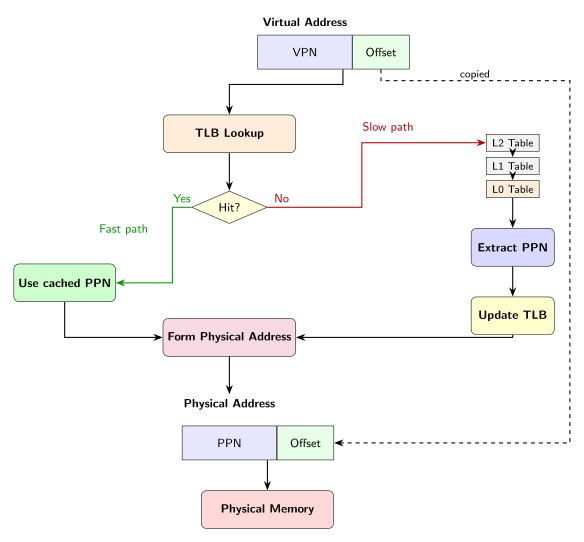
When the CPU needs to translate a VA, it extracts the VPN and looks it up in the TLB. Each TLB entry stores a mapping from a VPN to the corresponding PPN (along with permission bits). If the VPN is found (TLB hit), the CPU combines the cached PPN with the offset to form the PA immediately, typically in a single cycle.
If the VPN is not found (TLB miss), the CPU performs the full page table walk we described earlier: reading L2, L1, and L0 PTEs from memory. After obtaining the PPN, the hardware stores this translation in the TLB (evicting an old entry if necessary), then proceeds with the memory access. Future accesses to the same virtual page will hit the TLB and skip the walk.
An important thing to note is that programs exhibit localty: they tend to access the same pages repeatedly. Once a page’s translation is in the TLB, subsequent accesses to that page are fast. The TLB is small (typically 32 to 256 entries), but because of locality, hit rates of 95-99% or higher are common for many workloads (Arpaci-Dusseau & Arpaci-Dusseau, 2018; Chen, Borg, & Jouppi, 1992).
A TLB Hit Example
Let’s trace through what happens when the CPU accesses VA 0x12345678 with a warm TLB (i.e.: the translation is already cached).
Step 1: The CPU extracts VPN = 0x12345 and offset = 0x678 from the VA.
Step 2: The CPU looks up VPN 0x12345 in the TLB. Suppose entry 7 contains:
| VPN | PPN | Flags |
|---|---|---|
0x12345 |
0x80003 |
V=1, R=1, W=1, U=1 |
This is a hit. The TLB provides PPN 0x80003 immediately.
Step 3: The CPU checks the permission bits against the access type. Suppose this is a load (read). The R bit is set, so the access is permitted.
Step 4: The CPU forms the PA: (0x80003 << 12) | 0x678 = 0x80003678.
Step 5: The CPU accesses physical memory at 0x80003678.
Total memory accesses: 1 (just the target data). The three page table reads were completely avoided.
A TLB Miss Example
Now suppose the CPU accesses VA 0x0000003FABCDE678 for the first time, with a cold TLB (no cached entry for this page).
Step 1: The CPU extracts VPN = 0x3FABCDE (the full 27-bit VPN) and offset = 0x678.
Step 2: The CPU looks up VPN 0x3FABCDE in the TLB. No entry found. This is a TLB miss.
Step 3: The CPU performs the full page table walk we described in Three-Level Address Translation:
- Read L2 PTE from
0x802007F0, get pointer to L1 at0x80201000 - Read L1 PTE from
0x80201AF0, get pointer to L0 at0x80202000 - Read L0 PTE from
0x802026F0, extract PPN =0x80C03
Step 4: The CPU stores the translation (VPN 0x3FABCDE → PPN 0x80C03) in the TLB, along with the permission bits from the L0 PTE.
Step 5: The CPU forms the PA: (0x80C03 << 12) | 0x678 = 0x80C03678.
Step 6: The CPU accesses physical memory at 0x80C03678.
Total memory accesses: 4 (three for the page walk, one for the target data).
The next time the CPU accesses any address in the range 0x0000003FABCDE000 to 0x0000003FABCDEFFF (the entire 4 KiB page), the TLB will hit and only one memory access will be needed.
Why Software Must Flush the TLB
The TLB is a cache, and like any cache, it can become stale (I plan to write a blog post on caches, will update this and link to that when it’s up). The TLB caches VA → PA translations that it derived from page table entries. If the kernel modifies a PTE (changes the mapping, changes permissions, or invalidates it entirely), the TLB’s cached copy becomes inconsistent with the actual page table.
The hardware does not automatically detect these changes. If the TLB has a stale entry and the CPU uses it, the CPU will access the wrong physical address or ignore permission changes. This is a correctness bug.
Consider what happens during a context switch. When the kernel switches from process A to process B:
- Process A has its own page table. The TLB contains entries from A’s address space (e.g., VA
0x1000→ PA0x80100000). - The kernel loads process B’s page table into
satp. - Process B also uses VA
0x1000, but it maps to a different physical page (e.g.,0x80200000).
If the TLB still contains A’s entry for 0x1000, process B’s access to 0x1000 would incorrectly go to A’s physical page. Process B would read or write A’s data.
The solution is to flush the TLB whenever the address space changes. RISC-V provides the sfence.vma instruction for this purpose. Executing sfence.vma invalidates all TLB entries, forcing subsequent translations to walk the page table and reload fresh entries.
sfence.vma in xv6
xv6 wraps the sfence.vma instruction in a helper function in kernel/riscv.h:
// flush the TLB.
static inline void
sfence_vma() {
  // the zero, zero means flush all TLB entries.
  asm volatile("sfence.vma zero, zero");
}
The instruction sfence.vma zero, zero flushes all TLB entries on the current hart (hardware thread). The two zero operands mean “all address spaces” and “all addresses”. RISC-V also supports more targeted flushes (e.g., flush only entries for a specific address or ASID), but xv6 uses the simplest form.
You’ll find sfence_vma() called in several places in xv6. The most important is in kvminithart() in kernel/vm.c:
void
kvminithart() {
  // wait for any previous writes to the page table memory to finish.
  sfence_vma();

  w_satp(MAKE_SATP(kernel_pagetable));

  // flush stale entries from the TLB.
  sfence_vma();
}
The first sfence_vma() ensures that any writes to page table memory have completed before we switch to the new page table.12 The second sfence_vma() flushes the TLB after loading the new satp, ensuring no stale entries from the previous address space remain.
You’ll also find sfence.vma in trampoline.S, surrounding the satp switches during trap entry and exit:
# wait for any previous memory operations to complete, so that
# they use the user page table.
sfence.vma zero, zero

# install the kernel page table.
csrw satp, t1

# flush now-stale user entries from the TLB.
sfence.vma zero, zero
The pattern is the same: flush before switching satp to ensure pending memory operations complete with the old page table, then flush after switching to remove stale entries.
The PTE_G (Global) Flag
Recall from the Page Table section that each PTE has a G (Global) bit. We mentioned it was “a TLB optimization hint” but didn’t explain how. Now we can.
When PTE_G is set, the entry is marked as global, meaning it’s valid across all address spaces. The hardware can keep global entries in the TLB even when the ASID (Address Space Identifier) changes or when a non-global flush is issued.
Why is this useful? Consider kernel mappings. The kernel page table maps kernel code and data at the same virtual addresses for all processes (this is the identity mapping we discussed in The Result: Kernel Address Space). When the CPU switches from user mode to kernel mode, it switches to the kernel’s address space, but the kernel’s VPN → PPN mappings are identical regardless of which process was running. There’s no need to flush kernel entries from the TLB on every context switch.
By marking kernel PTEs with PTE_G, the hardware can preserve these entries across address space switches, improving TLB hit rates for kernel code. Actual operating systems use this optimization extensively. xv6 doesn’t set PTE_G (keeping the implementation simple), so all entries are flushed on every sfence.vma.
Performance Implications
The TLB has a large impact on memory access performance. Here are rough estimates for a typical system (actual values vary significantly by architecture and implementation):
| Operation | Latency |
|---|---|
| TLB hit | ~1 cycle |
| TLB miss (page table walk) | ~10-100 cycles |
| Main memory access | ~100-300 cycles |
A TLB miss adds significant overhead to every memory access until the translation is cached. With a 99% TLB hit rate, the average translation cost is approximately:
$$0.99 \times 1 + 0.01 \times 50 = 1.49\ \text{cycles}$$But with a 90% hit rate, it jumps to:
$$0.90 \times 1 + 0.10 \times 50 = 5.9\ \text{cycles}$$This is why reducing TLB misses is so important (well at least in applications where latency is critical). Superpages help (one TLB entry covers 2 MiB or 1 GiB instead of 4 KiB). The PTE_G flag helps (kernel entries don’t need flushing). ASID support helps (entries from different processes can coexist in the TLB, reducing flushes on context switches). These are techniques that most operating systems use to maximize TLB efficiency.
Common Questions
Where do VA’s come from?
We mentioned earlier that a program uses VA’s to reference actual locations in memory. For example, if we have a symbol blah for a function foo in our program X, there is an associated VA for this symbol blah.
So who gives/assigns this VA?
In short, that’s the job of the compiler and linker. When you compile a program, the compiler generates object files with symbolic references. You can think of symbolic references as placeholders like “the address of function foo” or “the address of global variable bar”, rather than actual numbers. The linker then resolves these symbols and assigns concrete virtual addresses according to a linker script (or a default layout). The resulting executable (an ELF file on Linux/Unix) contains sections (.text, .data, .bss, etc.) with specified virtual addresses baked in.
When the OS loads the program, it reads these addresses from the executable and sets up page tables to map those VAs to physical memory. The program’s code was compiled assuming it would live at those addresses, and the kernel makes that assumption true.
I will make a separate short blog post on this in the future, will link to that once it’s done.
Who knows physical addresses?
If user processes only see virtual addresses, who actually knows about physical addresses? The kernel does.
The kernel manages all physical memory. In xv6, kalloc() maintains a free list of every physical page from end to PHYSTOP. When you call kalloc(), it returns a physical page. The kernel tracks what every physical page is used for: free, page table, user code, trapframe, kernel stack, etc.
This isn’t limited to special cases like trapframes. The kernel knows physical addresses for everything:
- Page tables themselves. PTEs contain physical page numbers, not virtual ones. The
satpregister holds the physical address (PPN) of the root page table. - User process pages. When the kernel allocates memory for a user process (code, data, stack, heap), it gets physical pages from
kalloc()and creates PTEs mapping user VAs to those physical pages. - Kernel code and data. The kernel’s own memory is backed by physical pages.
How does the kernel work with physical addresses conveniently? Through identity mapping (or direct mapping). In xv6, the kernel maps physical RAM so that kernel VA == PA. When kalloc() returns 0x80456000, that value is both a kernel VA and the PA. The kernel can dereference it directly (as a VA), and it can also store it in a PTE (as a PA). No conversion needed.
To be clear, this technique isn’t xv6-specific. Linux uses a similar approach (often with a fixed offset rather than VA == PA exactly), because any kernel that manages memory needs easy access to physical addresses.
To sum up:
| Knows PAs? | Why | |
|---|---|---|
| Kernel | Yes | Manages physical memory and builds page tables |
| User processes | No | Only see their VA space; the kernel maintains the illusion |
The whole point of virtual memory is that user processes don’t need to know physical addresses. The kernel handles all the physical memory bookkeeping so that user programs can pretend they each have their own private, contiguous address space.
Why MAXVA is $2^{38}$ instead of $2^{39}$?
If we take a look at kernel/riscv.h, we see that MAXVA is defined as follows:
// one beyond the highest possible virtual address.
// MAXVA is actually one bit less than the max allowed by
// Sv39, to avoid having to sign-extend virtual addresses
// that have the high bit set.
#define MAXVA (1L << (9 + 9 + 9 + 12 - 1))
The expression (1L << (9 + 9 + 9 + 12 - 1)) equals (1L << 38), which is $2^{38}$. The comment says “one beyond the highest possible virtual address”, meaning MAXVA is the first invalid address, and the highest valid address is MAXVA - 1 = $2^{38} - 1$.
But why $2^{38}$? Why not $2^{39}$, given that Sv39 uses 39-bit virtual addresses? This is due to RISC-V Sv39 sign extension requirement. We have talked about sign extension earlier just briefly in the section about VAs. So, let’s go over it again.
Basically the idea of sign extension is as follows: if you have N bits but you only use k bits, where k < N, then to sign extend means setting all the bits from indices k + 1 to N-1 inclusive to whatever the value of the bit at k is.
In literature, k is also called the “high bit” because it is the highest bit among the available bits you’re actually using.
RISC-V Sv39 says the following:
Hardware (that implements RISC-V Sv39) enforces canonical address format: bits [63:39] must all be copies of bit 38. i.e.: Hardware must sign-extends the high bit.
What is the consequence of this requirement? Well now you have 2 valid address ranges:
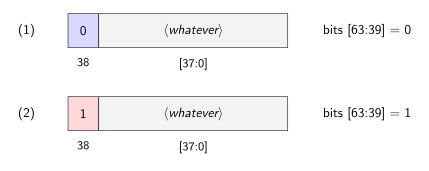
(1) is called the lower canonical address (bit 38 = 0) whereas (2) is called the upper canonical address (bit 38 = 1).
So, now we have:
$$2 \cdot 2^{38} = 2^{39}$$total addresses available.
Okay, do we have an issue with this? What’s the problem with addresses $2^{38} \to 2^{39}-1$? To answer this, let’s ask how does $2^{38}$ looks like?
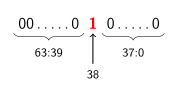
As you can see, this violates RISC-V Sv39 requirement (it requires bit 63:39 to be 1 since bit 38 is 1).
What about $2^{39}-1$? It looks like this:
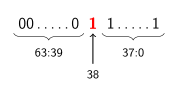
Same thing. It violates the requirement enforced by RISC-V Sv39 as well.
Thus, whenever bit 38 $\neq x,\ \forall x \in [$63:39$]$, the hardware raises a page fault.
So, what’s the solution for this? xv6’s solution is it uses only the lower canonical addresses. Why? For simplicity and also this way no need sign extension handling in any address arithmetic.
Is there any alternative? Yes. Some of these are:
- You can use both the upper and lower canonical forms, similar to Linux.
- Handle sign extension, i.e.: ensure every single address manipulation preserves the canonical form.
- Direct-mapping kernel to upper half.
- … many more I believe.
Summary
What we can conclude is virtual memory solves the following fundamental problem: how do multiple programs share physical RAM without interfering with each other? How it solves it? Well, the blog post is very long, but in one word: indirection. What we mean by that is programs use virtual addresses (VAs), not physical addresses (PAs). A translation layer, implemented in hardware and configured by the kernel, converts every memory access from VA to PA.
The core data structure that enables all of this is the page table, a mapping from virtual page numbers (VPNs) to physical page numbers (PPNs). Each entry (PTE) contains a 44-bit PPN and permission flags (V, R, W, X, U, etc.). A flat page table would require $2^{27}$ entries for Sv39’s 27-bit VPN, wasting memory on the vast majority of entries that are never used.
Sv39’s three-level design solves this issue. The 27-bit VPN splits into three 9-bit indices (L2, L1, L0). Translation walks through three levels of 512-entry tables, allocating pages only for regions actually in use. Most of a process’s address space is unmapped, and no memory is wasted on those missing mappings.
The hardware performs this walk automatically on every memory access:
- Read
satpto find the L2 table’s physical address - Index into L2 with VPN[26:18], get pointer to L1
- Index into L1 with VPN[17:9], get pointer to L0
- Index into L0 with VPN[8:0], extract the PPN
- Combine PPN with offset to form the final PA
xv6 mirrors this process in software. walk() traverses the page table following the same three indices, optionally allocating missing levels. mappages() uses walk() to install PTEs for a range of virtual addresses.
In other words, we can say that the hardware and software see the same structure from different perspectives: hardware reads it to translate addresses, software writes it to define the address space.
Then, we talked about TLB. The TLB caches recent translations to avoid the cost of repeated page walks. Software must flush stale entries (via sfence.vma) whenever page tables change.
In summary, virtual memory is the idea of using the concept of indirection and applying it to memory. What do we mean by that? As discussed, a VA is NOT the location of data; it is a name that the page table maps to a location. This indirection enables isolation (each process has its own namespace), flexibility (the kernel controls what each name means), and abstraction (programs don’t need to know where they physically reside). The same principle appears throughout systems: file descriptors, DNS, function pointers. Virtual memory is just one instance of a general pattern.
References
Cox, R., Kaashoek, F., & Morris, R. (2025). xv6: a simple, Unix-like teaching operating system. https://pdos.csail.mit.edu/6.1810/2025/xv6/book-riscv-rev5.pdf
Cox, R., Kaashoek, F., & Morris, R. (n.d.). xv6-riscv. GitHub. https://github.com/mit-pdos/xv6-riscv
RISC-V International. (2021). The RISC-V Instruction Set Manual, Volume II: Privileged Architecture (Document Version 20211203). https://github.com/riscv/riscv-isa-manual
Stroustrup, B. (2024). Programming: Principles and Practice Using C++ (3rd ed.). Addison-Wesley.
Rigtorp, E. (n.d.). SPSCQueue. GitHub. https://github.com/rigtorp/SPSCQueue
Rigtorp, E. (n.d.). Huge Pages. https://rigtorp.se/hugepages/
Patterson, D. A., & Hennessy, J. L. (2017). Computer Organization and Design RISC-V Edition: The Hardware Software Interface. Morgan Kaufmann.
Arpaci-Dusseau, R. H., & Arpaci-Dusseau, A. C. (2018). Operating Systems: Three Easy Pieces. Arpaci-Dusseau Books. https://pages.cs.wisc.edu/~remzi/OSTEP/
Chen, J. B., Borg, A., & Jouppi, N. P. (1992). A simulation based study of TLB performance. ACM SIGARCH Computer Architecture News, 20(2), 114-123. https://doi.org/10.1145/146628.139708
-
Throughout this post, I use binary unit prefixes (KiB, MiB, GiB, EiB) rather than decimal prefixes (KB, MB, GB, EB). In the binary system, 1 KiB = $2^{10}$ bytes, 1 MiB = $2^{20}$ bytes, 1 GiB = $2^{30}$ bytes, and 1 EiB = $2^{60}$ bytes. This is the correct notation when dealing with powers of 2, which is what memory and address spaces are based on. The decimal prefixes (1 KB = $10^3$ bytes, 1 GB = $10^9$ bytes, etc.) are often used colloquially for RAM sizes, but the binary prefixes are more precise for our purposes. ↩︎
-
Sv39 stands for “Supervisor virtual addressing with 39-bit virtual addresses”. It’s one of several paging modes defined by the RISC-V privileged specification. The “39” refers to the width of virtual addresses. RISC-V also defines Sv48 (48-bit) and Sv57 (57-bit) for systems that need larger virtual address spaces. ↩︎
-
The program counter (PC) is a CPU register that holds the address of the instruction currently being executed. After each instruction completes, the PC is incremented to point to the next instruction (unless a branch or jump changes control flow). In RISC-V, the PC is not directly accessible as a general-purpose register, but instructions like
auipccan compute addresses relative to it. ↩︎ -
The MMU is a hardware component, typically integrated into the CPU, that handles all virtual-to-physical address translation. When the CPU issues a memory access, the MMU intercepts the virtual address, performs the page table walk (or TLB lookup), and produces the physical address. The kernel’s role is to set up the page tables and load
satp; the actual translation on every memory access is done entirely in hardware by the MMU. ↩︎ -
The memory controller is a hardware component that interfaces between the CPU/MMU and the physical RAM chips. Once the MMU produces a physical address, the memory controller handles the electrical signaling to actually read from or write to RAM. In modern systems, the memory controller is typically integrated into the CPU die (Intel calls it the “integrated memory controller” or IMC). In older systems, it was a separate chip in the northbridge. ↩︎
-
Paging is not always enabled. During early boot, before the kernel sets up page tables, the CPU runs in “bare” mode where virtual addresses are used directly as physical addresses (no translation). In xv6,
kvminit()builds the kernel page table, thenkvminithart()loads it intosatpand enables Sv39 mode. From that point on, every memory access goes through address translation. Themodefield insatpcontrols this: mode 0 means bare (no paging), mode 8 means Sv39. ↩︎ -
The
satp(Supervisor Address Translation and Protection) register is a RISC-V control register that tells the MMU where to find the page table. It contains three fields: Mode (bits 63:60) specifies the paging mode (0 = Bare/no translation, 8 = Sv39, 9 = Sv48); ASID (bits 59:44) is an Address Space Identifier used for TLB optimization so the TLB doesn’t need to be flushed on every context switch; PPN (bits 43:0) is the physical page number of the root page table. On Intel x86, the equivalent register is CR3. ↩︎ -
The free list is how xv6 tracks which physical pages are available for allocation. It’s a linked list of free 4 KiB pages. When
kalloc()is called, it removes a page from the head of the list and returns it. Whenkfree()is called, it adds the page back to the head of the list. The list is initialized at boot bykinit(), which adds every physical page betweenend(where the kernel’s code/data ends) andPHYSTOPto the free list. This is a simple allocation scheme; real operating systems use more sophisticated allocators like buddy systems or slab allocators. I will talk about free list and how xv6 tracks physical pages in another blog post (well hopefully I’ll find time for that). ↩︎ -
Erik Rigtorp’s SPSCQueue, a high-performance single-producer single-consumer lock-free queue, optionally uses
MAP_HUGETLBto allocate the ring buffer with huge pages. This reduces TLB misses when the queue spans many pages, which matters for latency-sensitive applications like high-frequency trading systems. His article on huge pages provides a practical guide to using them in Linux applications. ↩︎ -
When R = W = X = 0, the hardware interprets the PTE as a pointer to the next level of the page table. At L0, there is no next level, so the translation algorithm would attempt to decrement the level counter below zero. The RISC-V specification states: “If i < 0, stop and raise a page-fault exception corresponding to the original access type”. So R = W = X = 0 at L0 isn’t a “reserved” encoding per se; it simply causes a page fault because the walk cannot continue. The actually reserved encoding is W = 1, R = 0 (writable but not readable), which the spec explicitly requires to trigger a page fault: “if pte.r = 0 and pte.w = 1… stop and raise a page-fault exception” (RISC-V International, 2021). ↩︎
-
There’s a subtle duality here: from the kernel’s perspective, the trampoline is actually reachable via two routes. Since the trampoline is part of kernel text (the linker places it before
etext), it’s already accessible at its identity-mapped address (e.g.,0x80007000). The explicitTRAMPOLINEmapping creates a second route to the same physical page. From the kernel’s view alone, this second mapping is redundant. But user page tables don’t identity-map kernel memory, so they need theTRAMPOLINEVA. The explicit mapping exists so that both page tables agree on where the trampoline lives, enabling the page table switch to work. I discuss this in more detail in my trampoline mapping post. ↩︎ -
The
sfence.vmainstruction also acts as a memory barrier, ensuring that all previous stores to page table memory are visible before the page table switch occurs. Without this barrier, the CPU might reorder writes to page table entries after thesatpwrite, causing the new page table to be used before it’s fully constructed. This is a subtle but important ordering requirement. ↩︎